System Navigation
The System Navigation menu provides access to the 17 primary modules in True Care System. Available menu items are displayed according to the authenticated user's assigned role and permissions.
Navigation Overview
After signing in, the main navigation menu is displayed across the top of the application. Use this menu to access the modules required for your daily work.
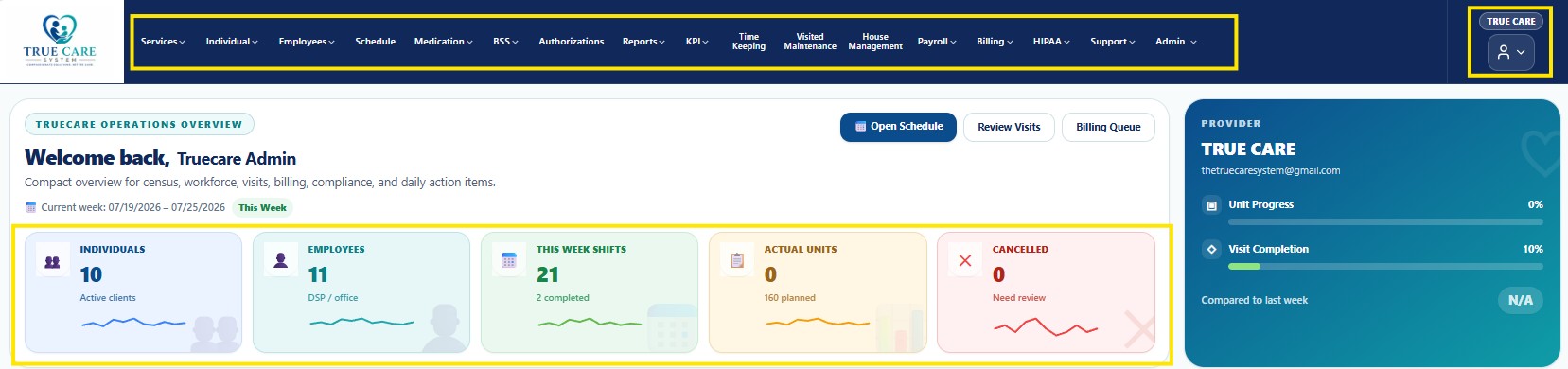
Figure 1. True Care System Main Navigation Menu
Navigation Modules
| No. | Module | Description |
|---|---|---|
| 1 | Services | Access service-related setup and operational functions. |
| 2 | Individual | Manage individuals receiving services, profiles, records, and related information. |
| 3 | Employees | Manage employee profiles, employment information, roles, and records. |
| 4 | Schedule | Create, review, and manage employee schedules and assigned shifts. |
| 5 | Medication | Manage medication-related information and Medication Administration Records (MAR). |
| 6 | BSS | Access Behavioral Support Services documentation and workflows. |
| 7 | Authorizations | Manage service authorizations, approved units, service dates, and service limits. |
| 8 | Reports | Generate operational, compliance, management, billing, payroll, and audit reports. |
| 9 | KPI | Review Key Performance Indicators and organizational performance metrics. |
| 10 | Time Keeping | Manage employee attendance, work hours, overtime, and time records. |
| 11 | Visited Maintenance | Review and maintain visit records, check-in and check-out information, corrections, and visit history. |
| 12 | House Management | Manage residential homes, locations, assignments, maintenance, and house operations. |
| 13 | Payroll | Review employee compensation, payroll processing, and payroll history. |
| 14 | Billing | Manage billing, EVV review, Sandata submissions, claim batches, and reimbursement workflows. |
| 15 | HIPAA | Access HIPAA compliance, privacy, security, audit logs, breach monitoring, and compliance tools. |
| 16 | Support | Access customer support, support tickets, troubleshooting, and maintenance tools. |
| 17 | Admin | Manage provider setup, users, roles, permissions, system configuration, and application settings. |
Role-Based Navigation
Each user only sees the modules authorized for the user's assigned role. Navigation access is controlled by True Care System's role-based security model.
- Provider Administrator
- Supervisor
- Office Staff
- DSP
- Nurse
- Behavioral Staff
- Billing Staff
- Payroll Staff
- Compliance Staff
- Support Staff
- Super Administrator
Navigation Tips
- Click a module name to open its available pages.
- Click the arrow beside a module name to display its submenu.
- Menu visibility depends on the user's assigned permissions.
- The current page or module may be highlighted automatically.
- Use the Home button below to return to the Getting Started page.
Security
- Protected modules require an authenticated session.
- Navigation visibility is controlled by role and permission assignments.
- Unauthorized modules and actions are restricted.
- Access activity may be recorded in Audit Logs.
HIPAA Considerations
- Access only the information required for assigned job responsibilities.
- Protect Protected Health Information (PHI) from unauthorized access.
- Do not leave the application open when the workstation is unattended.
- Always sign out after completing work.
Troubleshooting
- Refresh the browser if recent permission changes do not appear.
- Verify that the correct account is signed in.
- Contact the Provider Administrator if an expected module is unavailable.
- Contact Support if navigation does not load correctly.
FAQ
Why do other users see different menus?
Each user's navigation is based on the assigned role and permissions.
Why is a module missing?
Your account may not have permission to access that module.
Can users change the navigation menu?
No. Navigation access is managed by authorized administrators.