
GETTING STARTED
User Profile
The User Profile page allows authorized administrators to manage user account information, assigned roles, permissions, account status, and security settings. User access throughout the system is determined by the roles and permissions configured on this page.
Profile Overview
The User Profile page provides administrators with a centralized location to manage user accounts, role assignments, permission inheritance, and account security.
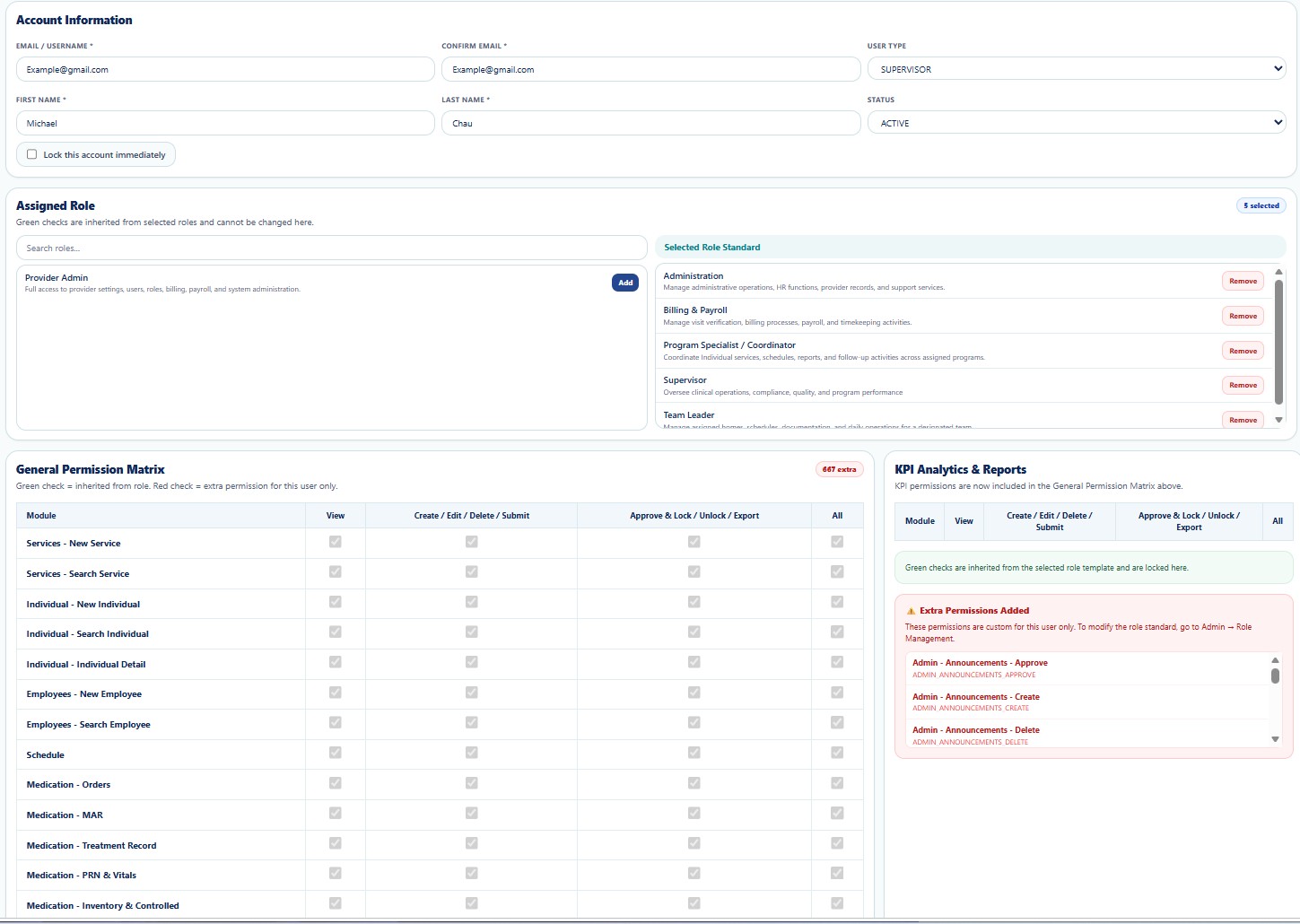
Figure 1. User Profile Management
Main Sections
| Section | Description |
|---|---|
| Account Information | Manage Email, Username, User Type, Status, First Name, Last Name, and account lock settings. |
| Assigned Role | Assign one or more role templates that automatically inherit standard permissions. |
| General Permission Matrix | Displays all permissions inherited from assigned roles. |
| Extra Permissions | Grant or revoke user-specific permissions without modifying the role template. |
| KPI Analytics & Reports | Displays KPI-related permissions included with assigned roles. |
Account Information
- Email / Username
- Confirm Email
- User Type
- First Name
- Last Name
- Status
- Lock Account Immediately
Assigned Roles
A user may be assigned one or multiple role templates. Permissions from all assigned roles are inherited automatically.
Examples include:
- Provider Administrator
- Supervisor
- Program Specialist
- Team Leader
- Billing & Payroll
- Administration
Permission Matrix
The General Permission Matrix displays all inherited permissions. Additional permissions granted specifically to the user are displayed separately under Extra Permissions Added.
Security
- Only authorized administrators may modify user accounts.
- Role assignments determine system access.
- Permission changes take effect immediately.
- Account lock prevents future logins.
HIPAA Considerations
- Grant only the minimum permissions required.
- Review user permissions regularly.
- Disable inactive accounts immediately.
- Protect access to Protected Health Information (PHI).
Troubleshooting
- Verify assigned roles.
- Review inherited permissions.
- Refresh the page after updating roles.
- Contact the System Administrator if changes are not applied.
Frequently Asked Questions
Can one user have multiple roles?
Yes. Users may inherit permissions from multiple assigned role templates.
Can I remove inherited permissions?
Inherited permissions are controlled by the assigned role template. User-specific permissions can be added separately.
When do permission changes take effect?
Changes are applied immediately after saving.