
REPORTS • SERVICE DOCUMENTATION
Daily Notes
Review Daily Notes submitted from Mobile EVV, compare scheduled and actual service activity, and open generated DOC or PDF service-note reports.
Reports shown in this guide may contain Protected Health Information (PHI). True Care System intentionally masks or removes real names, identifiers, contact information, signatures, and other sensitive values from screenshots. Any information that remains visible may be demonstration data created only for training and documentation.
Purpose
The Daily Notes report is the operational review page for service notes submitted from the True Care System Mobile EVV workflow. It allows authorized office, supervisory, compliance, and billing users to locate completed notes and compare the scheduled visit with the actual service activity.
The report is also the entry point for opening the generated service-note output in DOC or PDF format.
Daily Notes Report Workspace
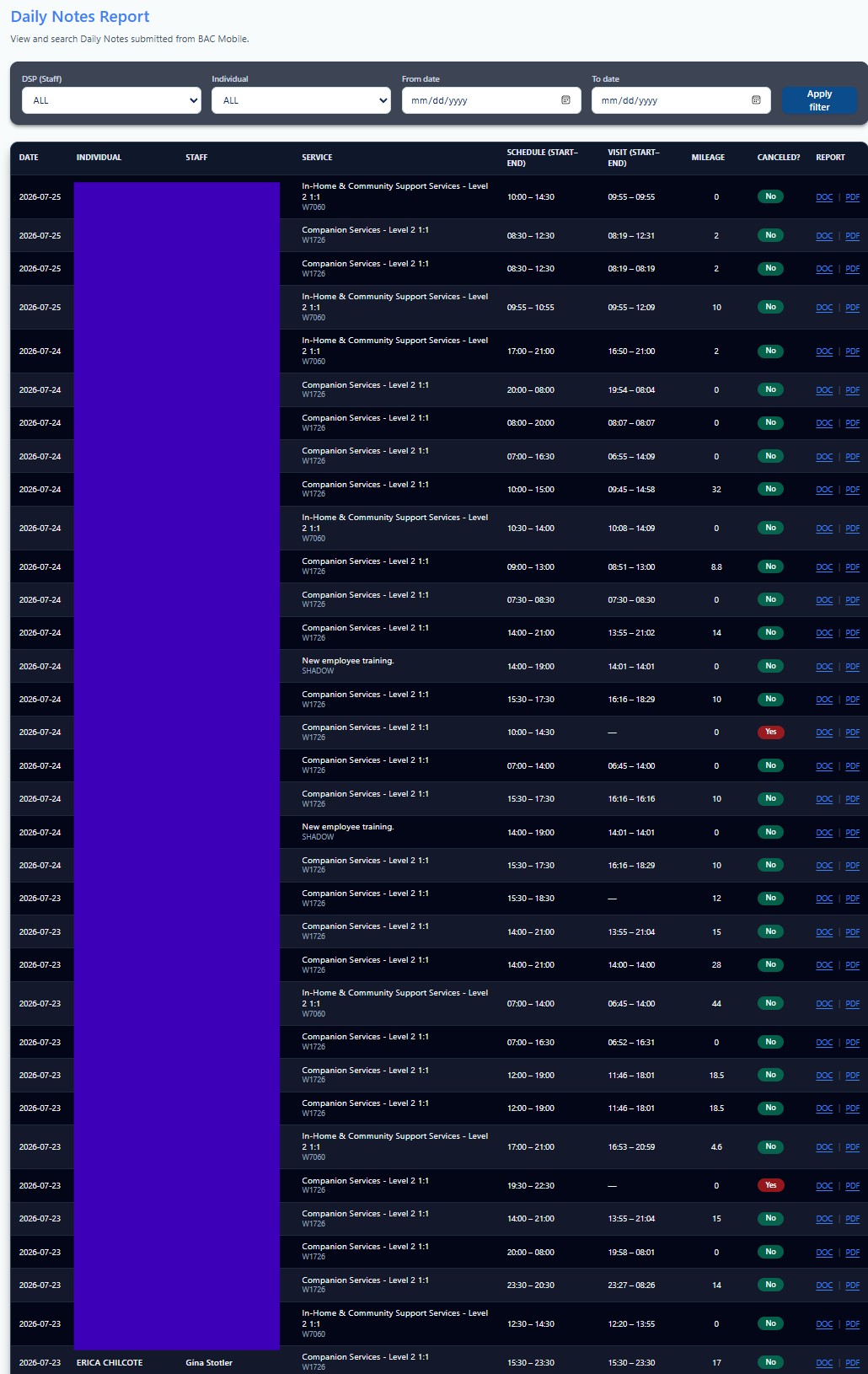
Search and Filter Controls
Limits the results to notes submitted by the selected DSP or staff member.
Displays only Daily Notes associated with the selected Individual.
Restricts the report to the selected service period before Apply Filter is used.
Result Columns
| Column | Meaning | |||||||
|---|---|---|---|---|---|---|---|---|
| Date | Service date associated with the submitted Daily Note. | |||||||
| Individual | Individual who received the service. | |||||||
| Staff | DSP or staff member who completed the note. | |||||||
| Service | Service name, service level, and service code. | |||||||
| Schedule | Scheduled start and end time. | |||||||
| Visit | Actual visit start and end time from the EVV record. | |||||||
| Mileage | Mileage recorded for the service when applicable. | |||||||
| Cancelled? | Indicates whether the scheduled service was cancelled. | |||||||
| Report | Opens the available DOC or PDF output for the selected Daily Note. | |||||||
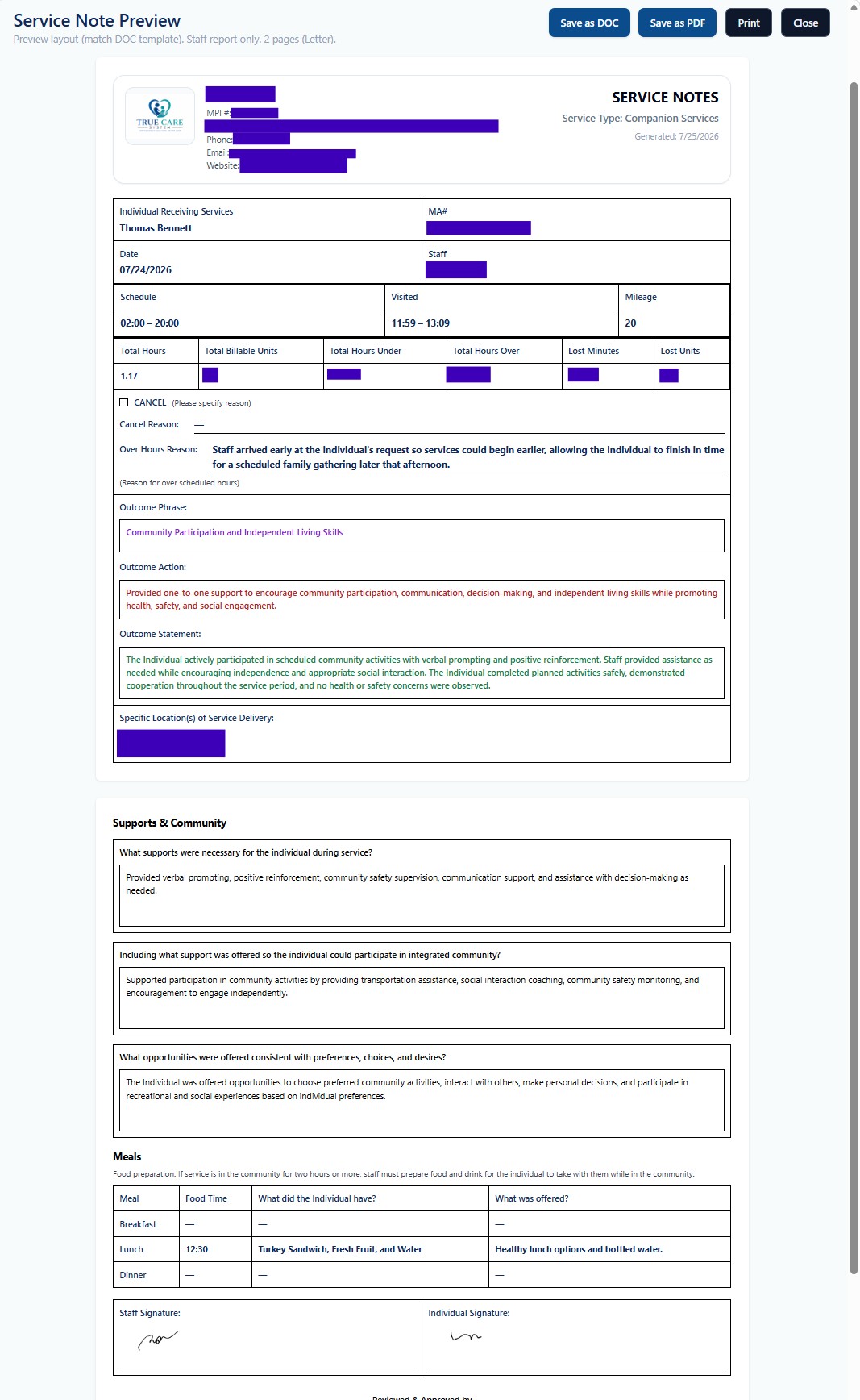
Printed Service Note
The generated report may include Provider information, the Individual and DSP, service date, scheduled and actual visit time, mileage, units, cancellation information, outcome documentation, service location, supports provided, community participation, meals, and required signatures.
Review Checklist
- Confirm the correct record.
Verify the Individual, staff member, service date, and service code. - Compare Schedule and Visit.
Review differences between scheduled time and actual EVV time. - Review documentation completeness.
Confirm outcomes, supports, notes, mileage, meals, and signatures where required. - Open the correct output.
Use DOC or PDF only after confirming the report belongs to the intended visit.
HIPAA, Security, and Proprietary Workflow
Access to report data must follow the Provider's role-based access, minimum-necessary, privacy, retention, and disclosure procedures. Users should verify the Provider, Individual, employee, date range, and record before printing, exporting, or sharing any report.
True Care System does not publicly disclose every audit correlation, escalation rule, investigation control, exception-handling process, or proprietary workflow. Advanced operating procedures are provided during direct training for authorized personnel of Providers that are official True Care System customers.