
SCHEDULE MANAGEMENT
Schedule
The Schedule module is used to build recurring Master Schedules, generate weekly shifts, review monthly scheduling activity, assign DSPs, manage service times and addresses, and coordinate service delivery for Individuals.
This public guide explains the general purpose and visible structure of the Schedule module. To protect the proprietary workflow and operational methods of True Care System, certain advanced scheduling procedures are intentionally not documented in full. Specialized workflows involving check-in, check-out, call-off handling, backup plan shifts, awake monitoring, conflict resolution, schedule recovery, and other advanced operational controls are provided through direct training after a Provider becomes an active True Care System customer.
Schedule Workspaces
Schedule is organized around a recurring Master Schedule, generated Weekly Schedule, Monthly Calendar Overview, and event or shift maintenance controls.
| Workspace | Purpose | Documentation |
|---|---|---|
| Master & Weekly Schedule | Create recurring weekly templates, generate shifts, review units, DSP assignments, and weekly status. | Open guide |
| Monthly Calendar | Review scheduled shifts by month, date, service, DSP, and status. | Open guide |
| Master Events | Add or edit recurring service events used by the Master Schedule. | Open guide |
| Weekly Shifts | Add or edit generated and one-time shifts within a selected week. | Open guide |
Master Schedule and Weekly Schedule
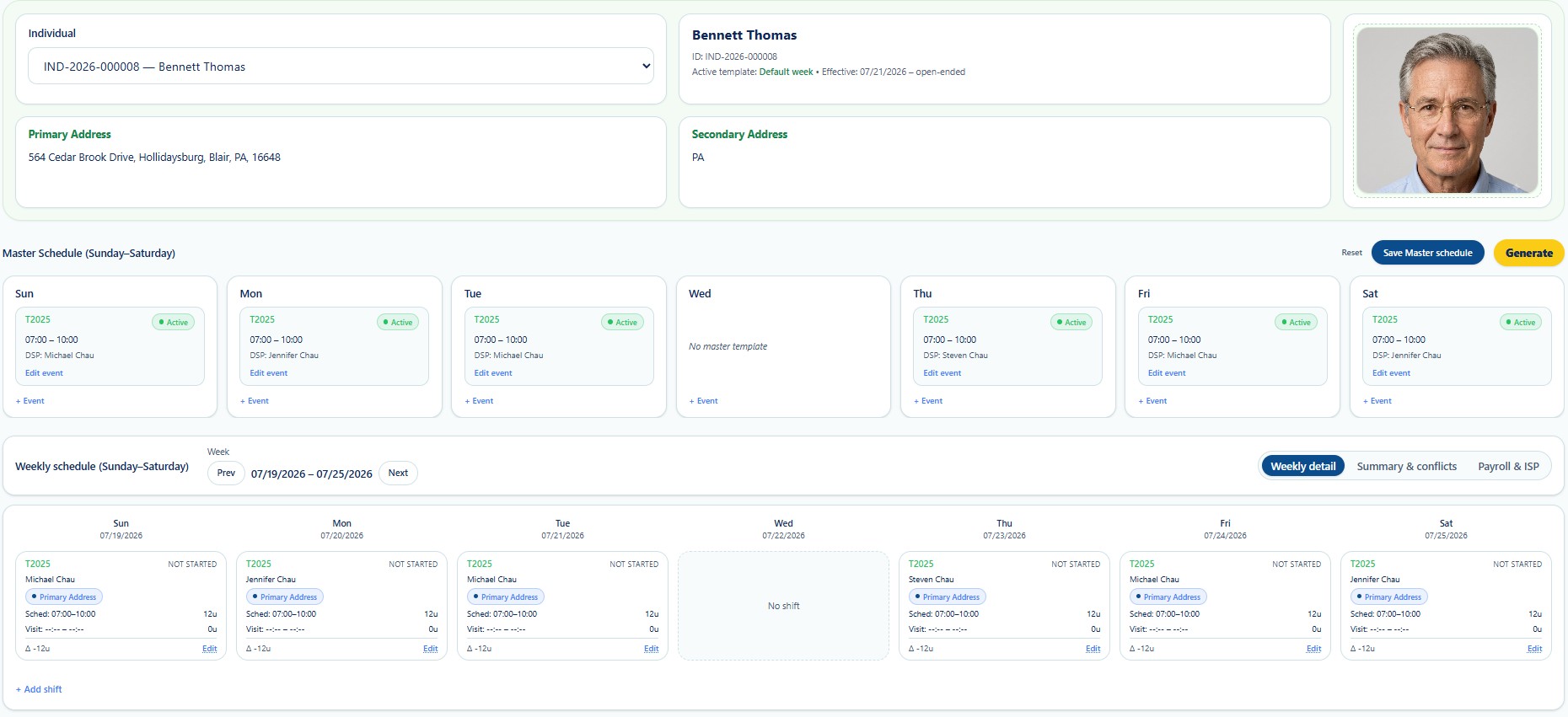
The main scheduling workspace displays Individual information, addresses, a Sunday-through-Saturday Master Schedule, and the generated Weekly Schedule for the selected week.
Main Functions
| Function | General Purpose |
|---|---|
| Individual Selector | Select the Individual whose recurring and weekly schedules will be reviewed. |
| Individual Summary | Displays name, Individual ID, template information, and effective dates. |
| Primary and Secondary Address | Provides approved service-location references for scheduling. |
| Master Schedule | Stores recurring service events for Sunday through Saturday. |
| Save Master Schedule | Saves changes made to recurring events. |
| Generate | Creates weekly shifts from the saved Master Schedule. |
| Weekly Detail | Displays generated shifts, scheduled units, actual units, and visit status. |
| Summary & Conflicts | Supports review of totals, overlaps, and scheduling conflicts. |
| Payroll & ISP | Supports comparison of staffing, payroll, authorization, and ISP-related units. |
Monthly Calendar Overview
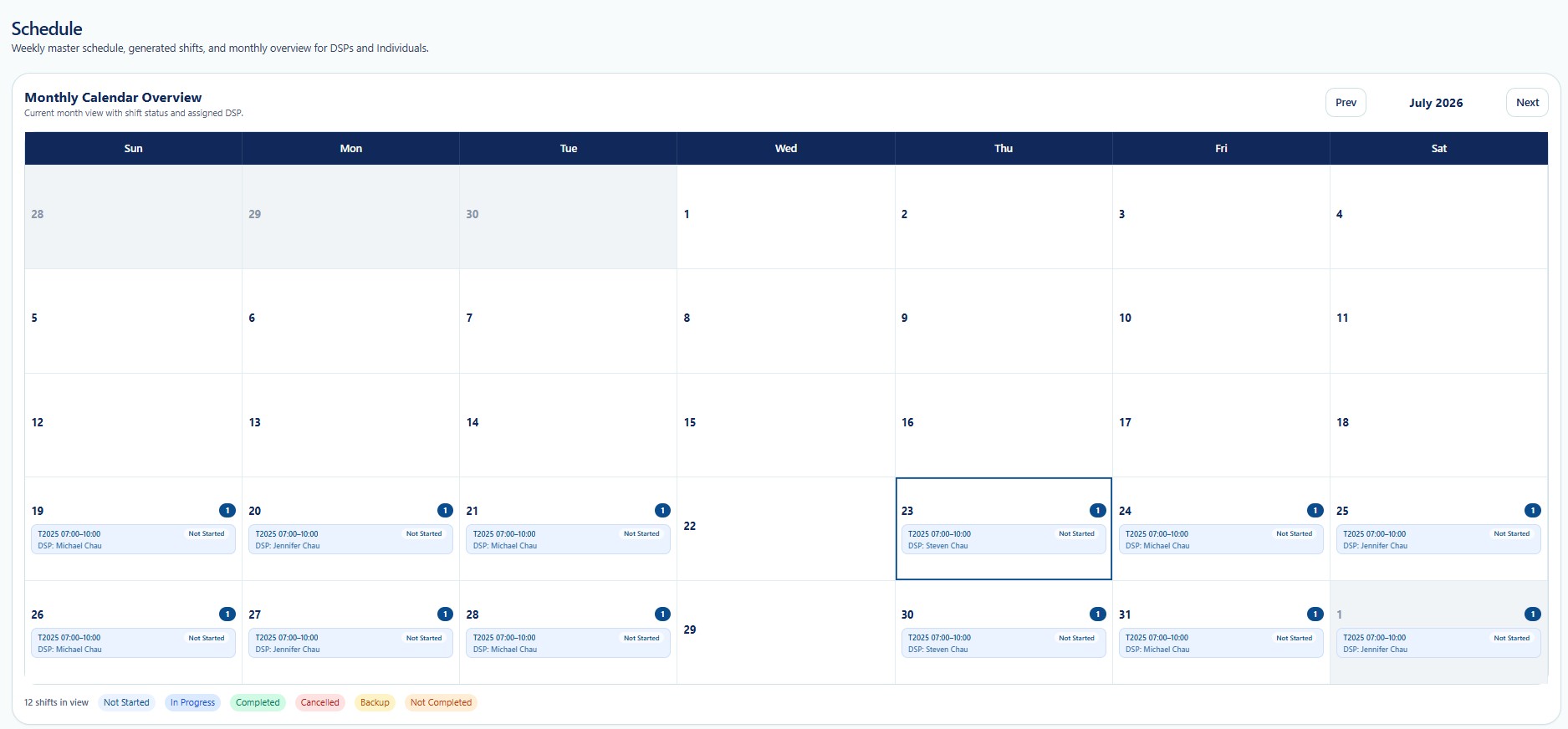
The Monthly Calendar provides a month-level view of scheduled shifts and allows users to review the number of shifts, assigned DSP, service time, and current status for each date.
Calendar Status Indicators
- Not Started
- In Progress
- Completed
- Cancelled
- Backup
- Not Completed
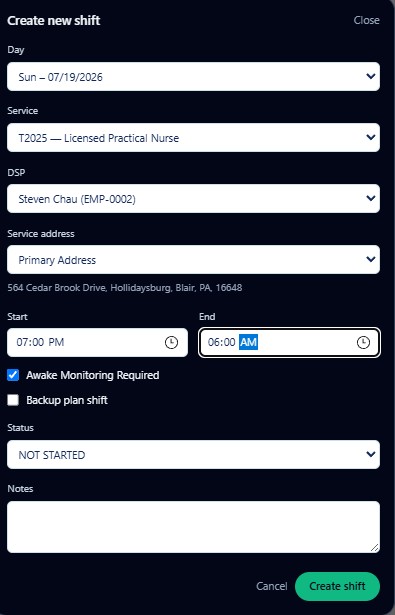
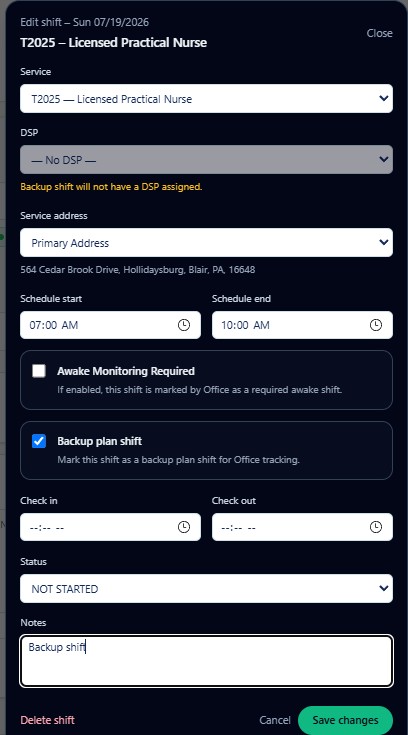
Master Events and Weekly Shifts
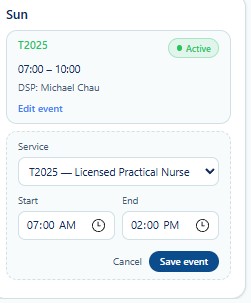
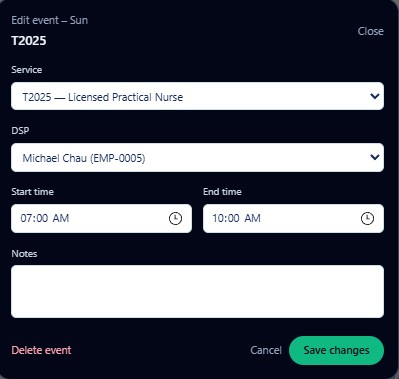
Master Events define recurring service patterns. Weekly Shifts represent generated or manually added service assignments for a specific date.
Information Used in Scheduling
| Information | How It Supports Scheduling |
|---|---|
| Individual | Identifies the person receiving the scheduled service. |
| Service | Determines the approved service code and service type. |
| DSP | Identifies the assigned employee when applicable. |
| Service Address | Identifies the approved location where service is expected. |
| Start and End Time | Defines the scheduled service period. |
| Status | Shows whether the shift is not started, active, completed, cancelled, or another configured status. |
| Notes | Stores necessary operational information about the event or shift. |
Awake Monitoring and Backup Plan Shifts
The Schedule module includes controls for identifying awake monitoring requirements and backup plan shifts. These options support operational tracking, staffing continuity, and service risk management.
The complete decision process for awake monitoring, call-off response, DSP replacement, backup plan activation, schedule recovery, and related compliance actions is proprietary. Active Provider customers receive direct role-based training for these workflows.
General Scheduling Workflow
- Select the correct Individual.
- Review Individual and service-location information.
- Review current authorizations, ISP units, and approved service dates.
- Create or update recurring Master Schedule events.
- Save the Master Schedule.
- Select the required week.
- Generate weekly shifts.
- Review assigned DSPs, service times, service addresses, and planned units.
- Review Summary & Conflicts.
- Review the Monthly Calendar when a broader scheduling view is needed.
Validation Checklist
- The correct Individual is selected.
- The correct service is used.
- The service is supported by an active authorization when required.
- The correct DSP is assigned when applicable.
- The service address is correct.
- Start and end times are accurate.
- The Master Schedule is saved before Generate is selected.
- The correct week is selected.
- Generated shifts are reviewed for overlaps and conflicts.
- Scheduled units are compared with authorization and ISP limits.
- Backup or awake-monitoring indicators are used only when operationally appropriate.
Best Practices
- Review authorization and ISP information before scheduling.
- Use Master Schedule for stable recurring service patterns.
- Use one-time weekly shifts only when appropriate.
- Verify the selected Individual before making changes.
- Confirm DSP availability and qualifications.
- Review conflicts before finalizing the schedule.
- Keep notes objective, necessary, and operationally relevant.
- Preserve historical scheduling and visit records.
- Use advanced scheduling controls only after Provider training.
Security and HIPAA
Schedule information may expose Individual names, addresses, service types, DSP assignments, visit times, operational notes, and other protected information.
- Access schedules only for assigned operational duties.
- Apply role-based access and the minimum necessary principle.
- Do not share screenshots containing Individual or employee information through unapproved channels.
- Verify the Provider and Individual before changing a schedule.
- Do not place unnecessary clinical information in Notes.
- Record schedule changes through Audit Logs where applicable.
Documentation Scope
Public documentation is intentionally limited to the general structure, field purpose, and standard user flow of the Schedule module. Certain advanced procedures are reserved for direct Provider onboarding and operational training.
This same documentation approach may be used in other True Care System modules when a complete public explanation could expose proprietary workflows, internal controls, specialized compliance procedures, or competitive operational methods.