
AUTHORIZATION MANAGEMENT
Authorizations
The Authorizations module is used to create, review, monitor, and maintain payer-approved service authorization records. It connects each Individual, payer, program, service, approved unit limit, authorization period, and utilization status to the Provider’s scheduling and billing workflow.
Authorization Workspace
The main authorization workspace provides access to authorization records, live utilization totals, filtering, exports, billing navigation, and creation of new authorization records.
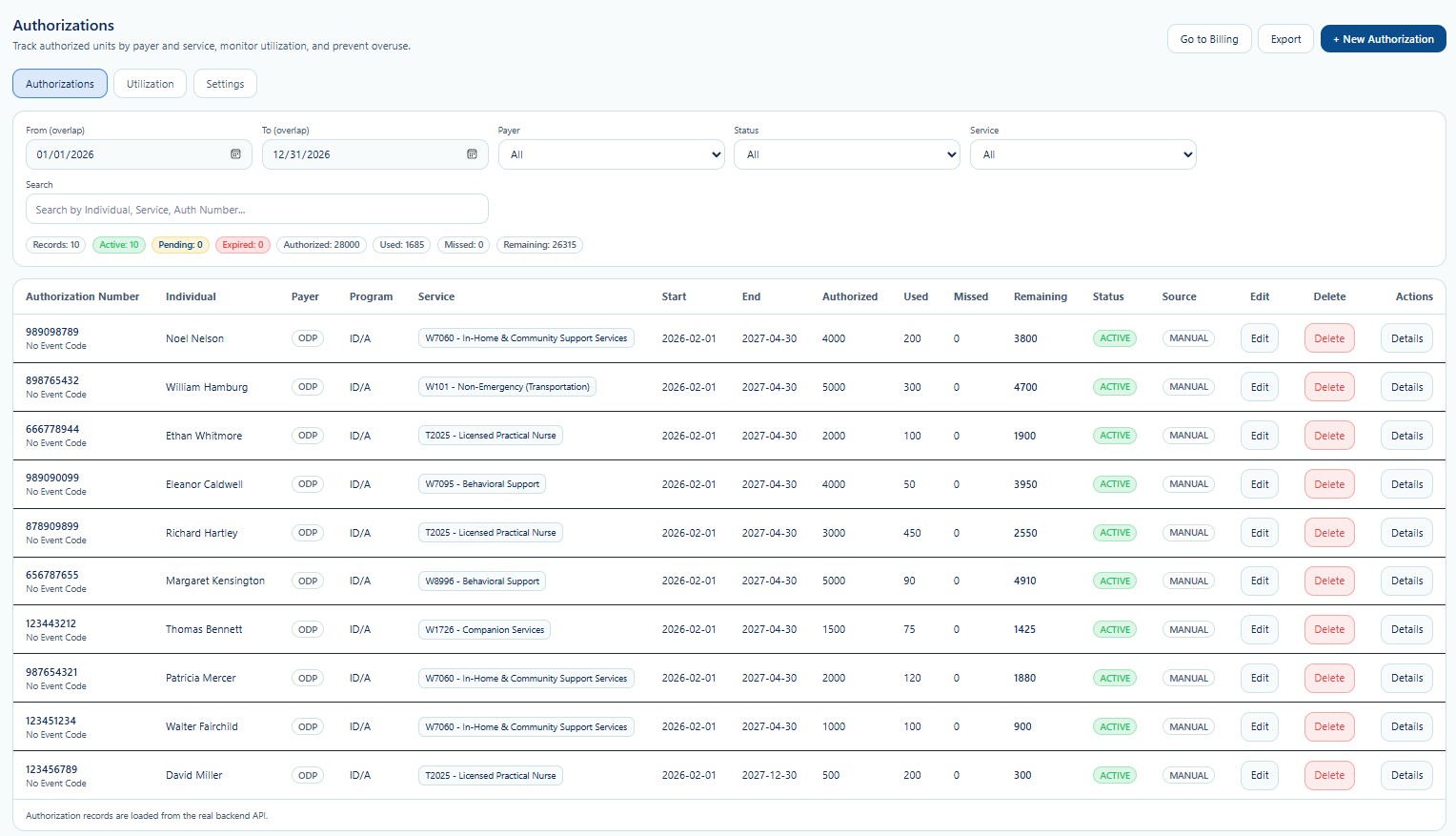
| Workspace | General Purpose | Documentation |
|---|---|---|
| Authorization Records | Review authorization numbers, Individuals, payers, programs, services, effective dates, approved limits, usage, remaining balances, source, status, and available actions. | Open guide |
| Utilization | Review live authorization usage by Individual and service, including authorized, used, missed, remaining, and utilization percentage values. | Open guide |
| New Authorization | Create a payer authorization, assign service lines, define dates and limits, and establish the historical usage snapshot used before system auto-calculation. | Open guide |
Utilization Monitoring
Utilization helps Provider staff compare approved service limits against actual service activity. The screen is designed to support early identification of overuse risk, underutilization, expiring authorizations, and remaining service capacity.
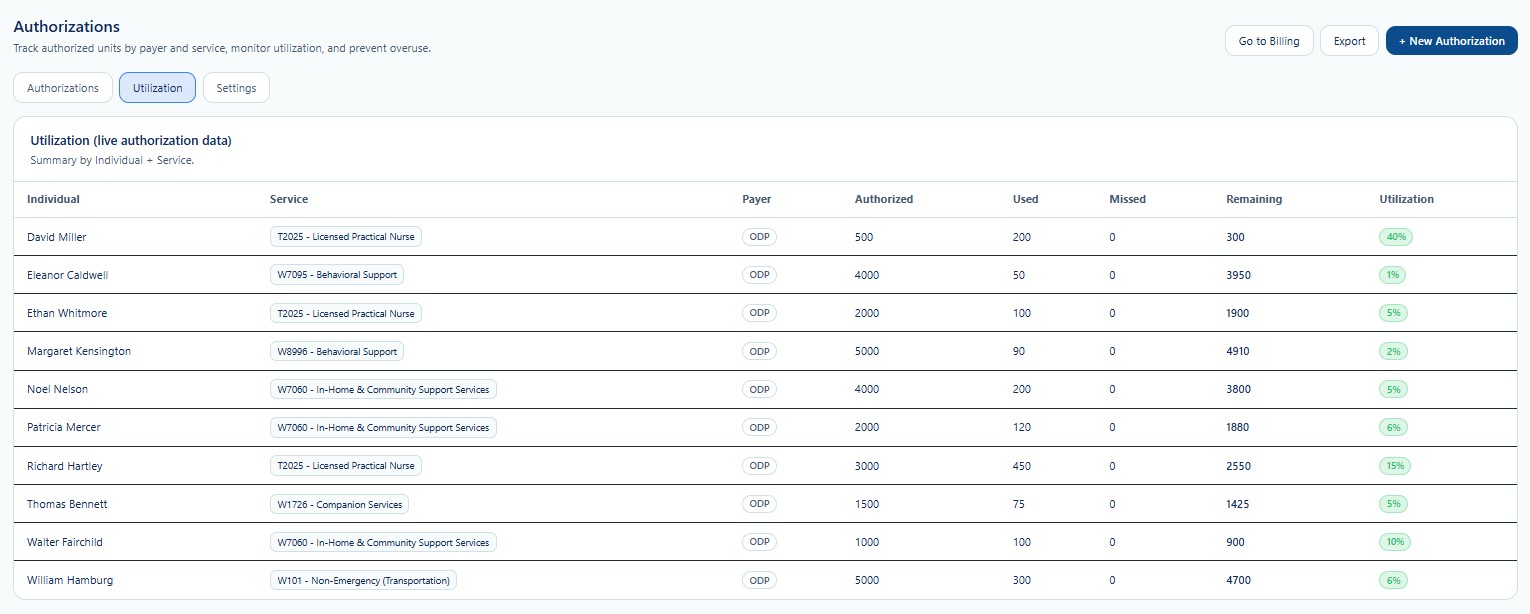
Authorized
The payer-approved maximum service quantity for the authorization period.
Used and Missed
Used values represent completed service activity; missed values support tracking of authorized service that was not delivered when applicable.
Remaining and Utilization
Remaining units and utilization percentage help staff monitor service capacity and prevent overuse.
New Authorization
New Authorization combines the Individual profile snapshot, payer information, authorization number, status, source, one or more service lines, authorization dates, maximum approved amount, historical usage, and current utilization preview.
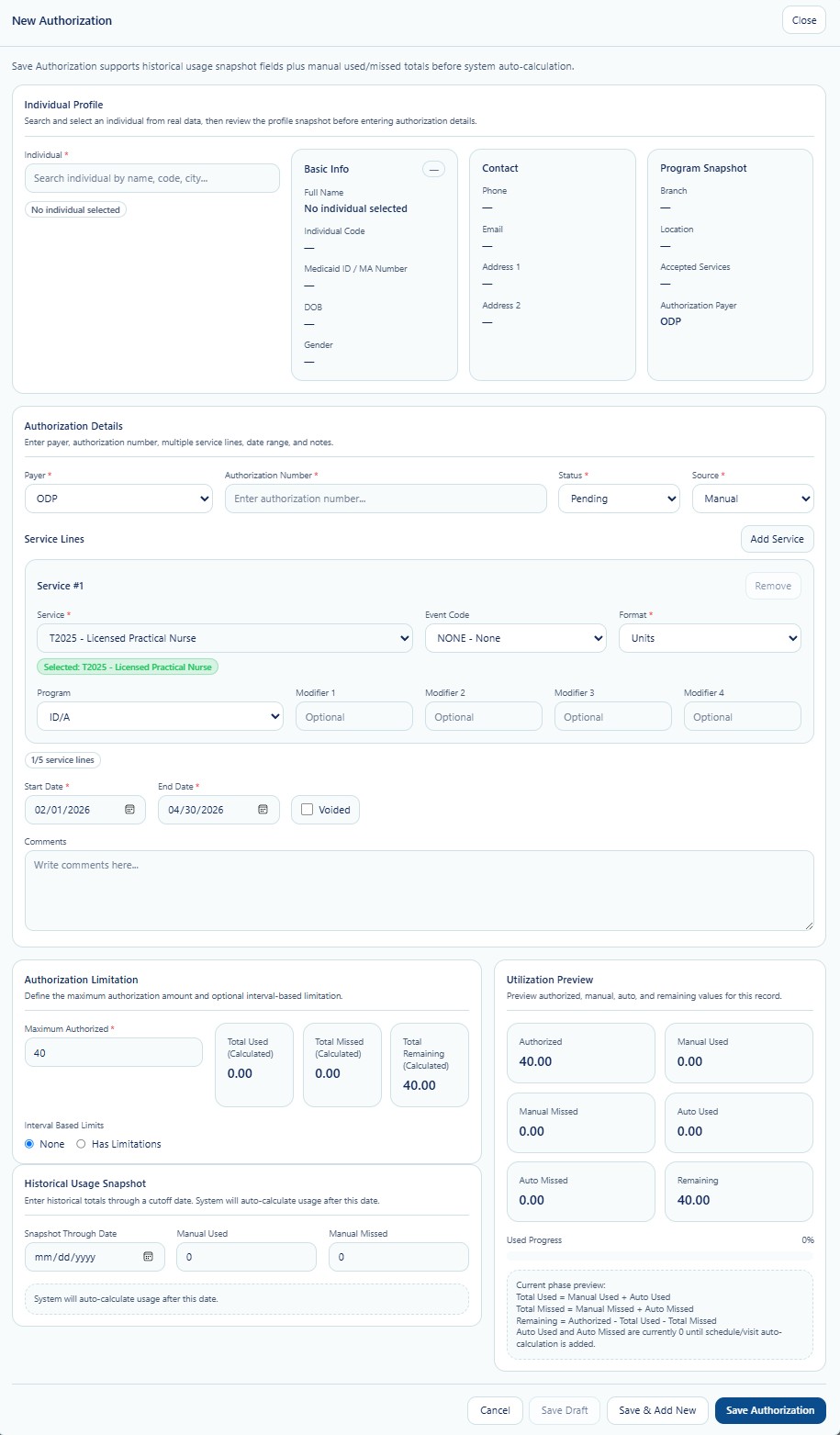
Confirm the correct Individual profile, Provider location, accepted services, and payer context.
Enter payer, authorization number, status, source, dates, and comments.
Select the approved service, event code, format, program, and modifiers where applicable.
Enter the approved limit and any historical usage snapshot required before automatic calculation begins.
Authorization Data Relationships
Authorization records may support several connected True Care System workflows. The exact behavior depends on the Provider’s payer configuration, service setup, scheduling workflow, billing rules, and implementation settings.
- Individual: Identifies the person receiving the authorized service.
- Payer and Program: Identifies the funding source and applicable program.
- Service: Connects the authorization to the Provider-configured service and billing code.
- Schedule and Visits: May contribute to automatic usage and missed-unit calculations.
- Billing: Uses authorization eligibility, dates, service, and remaining capacity during billing review.
- Reports and Audit Logs: Support operational review, traceability, and compliance monitoring.
HIPAA and Confidentiality
Authorization records may contain protected health information, payer identifiers, Medicaid or Medicare information, service needs, utilization history, and financial information. Access must be limited to authorized staff with a legitimate treatment, payment, or health-care-operations purpose.
- Use role-based access and the minimum necessary principle.
- Verify the correct Provider and Individual before viewing or changing an authorization.
- Do not share authorization screenshots or exported files through unapproved channels.
- Review access and changes through HIPAA and audit history where applicable.
- Use exports only for approved operational, payer, billing, compliance, or audit purposes.
Protected Operational Detail and Provider Training
This public documentation presents the general authorization workflow only. To protect HIPAA-sensitive processes and the proprietary design of True Care System, some advanced rules are intentionally not published here. These may include automatic utilization logic, historical cutover handling, service-line validation, schedule and visit reconciliation, missed-unit calculation, overuse prevention, billing safeguards, exception handling, and payer-specific implementation controls.
Provider customers receive direct implementation training from the True Care System team. Training is provided to authorized administrative, authorization, billing, compliance, clinical, and operational personnel after the Provider becomes an official customer.
Recommended Workflow
- Confirm the Provider and Individual.
Verify that the authorization belongs to the correct tenant and person. - Review the payer authorization.
Confirm the authorization number, payer, program, service, dates, status, and source. - Validate service limits.
Confirm authorized units and any historical used or missed values. - Monitor utilization.
Review used, missed, remaining, utilization percentage, and expiration risk. - Coordinate with scheduling and billing.
Resolve discrepancies before services are scheduled or claims are prepared.