
PROVIDER ADMINISTRATION
Admin
Central Provider administration workspace for users, roles, departments, announcements, branches, locations, account security, and Provider configuration.
Privacy, security, and administrative access notice
Administrative pages may display workforce identity, Provider identifiers, contact information, organizational assignments, role permissions, and access-control data. Public screenshots use redacted or demonstration information.
Admin Management Overview
The Admin module centralizes Provider-level configuration for users, role management, organizational structure, communications, branches, locations, account security, and Provider identity.
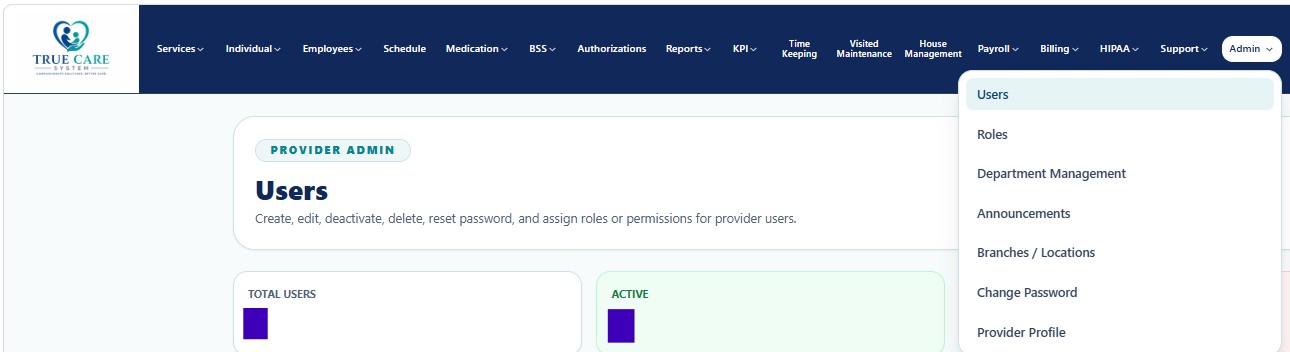
Recommended Administrative Sequence
- Complete Provider Profile and report branding.
- Create branches, regions, offices, and locations.
- Create departments and assign managers.
- Configure Role Management using least privilege and minimum necessary access.
- Create users and assign approved roles.
- Use announcements for controlled operational communication.
- Review HIPAA, Login History, and Audit Logs regularly.
Admin Guides
| Function | Purpose | Documentation |
|---|---|---|
| Users | Create and maintain Provider user accounts, status, password resets, and role assignments. | Open Guide → |
| Role Management | Define role-based permissions, access scope, least privilege, and separation of duties. | Open Guide → |
| Department Management | Create departments, assign managers, and organize employees for KPI and approvals. | Open Guide → |
| Announcements | Send role-targeted internal communications. | Open Guide → |
| Branches / Locations | Maintain regions, branches, offices, addresses, codes, and status. | Open Guide → |
| Change Password | Update authenticated-user credentials securely. | Open Guide → |
| Provider Profile | Maintain Provider identity, branding, contacts, identifiers, alerts, and defaults. | Open Guide → |
Security, HIPAA, and Audit Expectations
- Verify the correct Provider scope before changing data.
- Grant only access necessary for approved duties.
- Use Role Management to enforce least privilege and minimum necessary access.
- Do not include credentials, SSNs, full payment data, or unnecessary PHI.
- Use deactivation instead of deleting records required for accountability.
- Review significant changes through Audit Logs.