
BILLING • STEP 2
DSP Readiness
Validate Sandata Employee identification, mapping, employment, and sequence requirements.
Billing and EVV pages may contain PHI, Medicaid identifiers, employee identifiers, service information, visit dates, GPS evidence, claim-supporting data, and submission credentials. Screenshots in this public guide use redacted or demonstration information. Production access must be role-based, Provider-scoped, logged, and limited to the minimum information necessary.
True Care System has implemented the Sandata Alternate EVV workflow for Client, Employee, Visit, Call, correction, batching, transaction tracking, rejection review, and resubmission. The platform has completed the applicable Sandata testing and production-onboarding work for its certified payer program. Sandata certification is program-specific; availability in another state or payer program requires that program's registration, testing, approval, credentials, and current technical specifications.
True Care System sends required EVV data to the Sandata Aggregator. After accepted EVV submission, the Provider completes the Medicaid billing or claim workflow through the applicable state claims system, such as Pennsylvania PROMISe, unless the payer program specifies a different process.
Purpose
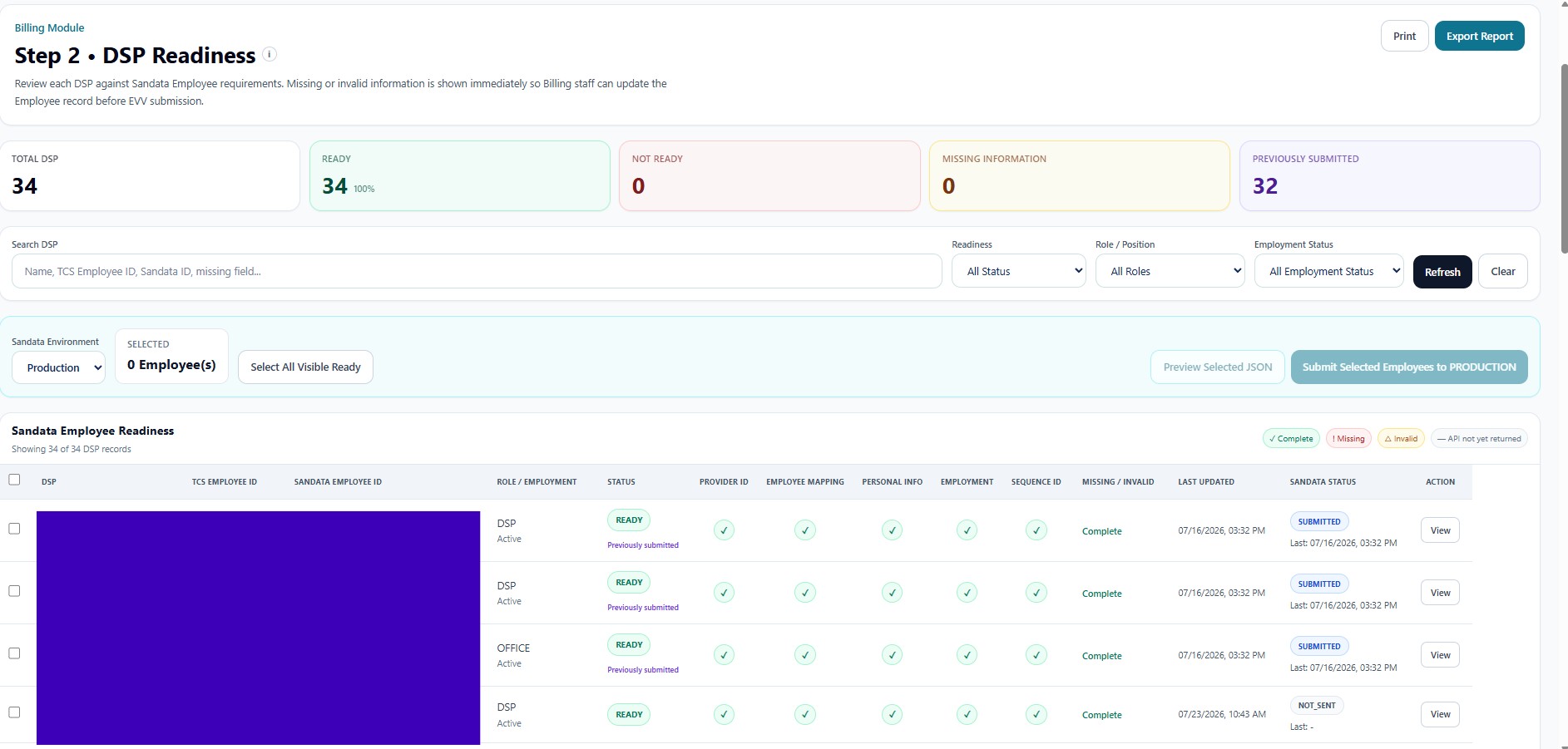
DSP Readiness validates every direct-care worker or eligible employee against Sandata Employee requirements before EVV submission. It confirms the employee's internal identity, Sandata identity, Provider relationship, mapping, employment information, status, and sequence data.
Summary Cards
| Card | Function |
|---|---|
| Total DSP | Total employees evaluated for Sandata Employee readiness. |
| Ready | Employees whose current records satisfy submission requirements. |
| Not Ready | Employees with missing or invalid required data. |
| Missing Information | Employees requiring source-record completion. |
| Previously Submitted | Employees with an earlier Sandata submission. |
Search and Filters
| Control | Function |
|---|---|
| Search DSP | Searches name, TCS Employee ID, Sandata Employee ID, or missing-field text. |
| Readiness | Filters ready and not-ready records. |
| Role / Position | Filters by DSP, Office, or another authorized workforce role. |
| Employment Status | Filters Active, Inactive, or other employment conditions. |
| Refresh / Clear | Reloads current data or resets the filter set. |
Selection and Submission
The page supports environment selection, ready-record selection, JSON preview, and submission of selected Employees. Production submission is restricted to valid records and should require authorized Billing or EVV administration permissions.
Validation Columns
The readiness table verifies Provider ID, Employee Mapping, Personal Info, Employment, and Sequence ID. It also shows role/employment, exact missing or invalid items, last update time, prior Sandata status, and a View action for detailed review.