
SUPPORT • SECURE PROVIDER ASSISTANCE
Provider Support
Create and track Provider support requests, control temporary support access, and preserve a complete audited support history.
Support tickets may contain PHI, screenshots, operational records, user identities, device details, IP addresses, and troubleshooting evidence. Public screenshots in this guide use redacted or demonstration information. Users must not place passwords, full Social Security numbers, complete payment-card information, or unrelated PHI in a ticket.
True Care System assigns every ticket a unique Provider-scoped ticket number, preserves ticket conversations and attachments, records support-access approval and expiration, and logs each authorized support or impersonation session. The audit trail is designed to show who requested access, who approved it, when access began and ended, which Provider was entered, and what actions were performed during the support session.
Provider Support Overview
The Support module gives each Provider a controlled, traceable channel for reporting technical, operational, billing, scheduling, payroll, Mobile App, Sandata, and account-related issues to the True Care System Platform Support team. The workflow is built around Provider isolation, unique ticket numbering, role-based visibility, documented communication, temporary access approval, and complete support-session auditing.
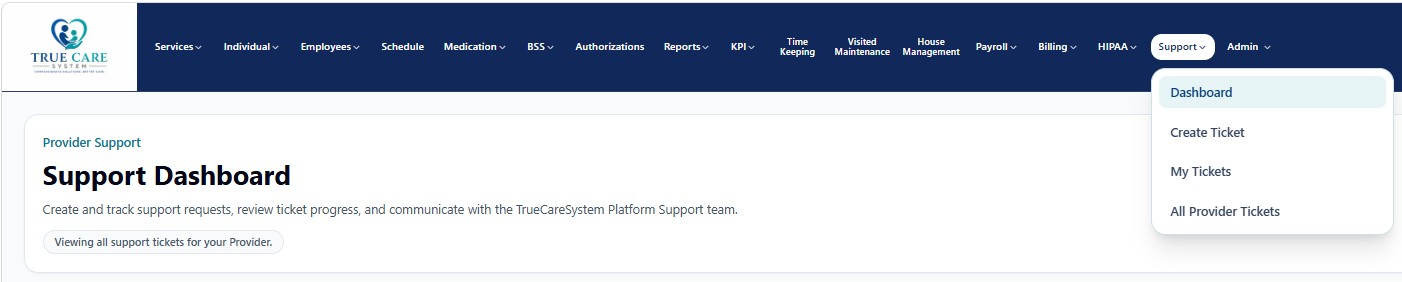
Support Workspaces
| Workspace | General Purpose | Documentation |
|---|---|---|
| Support Dashboard | Review ticket volume, status, priority, assignment, access approvals, recent activity, and quick actions. | Open guide |
| Create Ticket | Create a Provider-scoped support request, define the affected module, priority, description, attachments, and optional temporary Platform Support access. | Open guide |
| My Tickets | Review tickets created by the signed-in user and track status, assignment, messages, and updates. | Open guide |
| All Provider Tickets | Review all tickets available within the authenticated Provider, subject to role-based support-management authority. | Open guide |
Professional Support Lifecycle
- Provider creates a ticket.
The system assigns a unique ticket number such as SUP-2026-000007 and permanently associates the request with the authenticated Provider.
- Issue is classified.
Category, affected module, priority, description, attachments, requester, date, and operational impact are recorded.
- Support access is approved only when needed.
The Provider may authorize temporary Platform Support access and select an expiration time. Access automatically becomes invalid after expiration.
- Platform Support reviews and communicates.
Messages, status changes, assignments, files, and troubleshooting results remain associated with the ticket.
- Authorized support session is audited.
Each entry into the Provider environment is linked to the ticket and support session. Start time, end time, actor, Provider, role, and actions are retained.
- Resolution and closure are documented.
The final outcome, Provider response, access revocation, and closure history remain available for operational and compliance review.
HIPAA-Oriented Support Safeguards
Provider users are restricted to their own Provider by backend API scope, not merely by screen filters.
Support access requires Provider authorization and expires automatically at the approved date and time.
Ticket actions, attachments, approvals, impersonation start/end events, and support actions are preserved in audit history.
Support Access Governance
| Control | True Care System Approach |
|---|---|
| Ticket number | Automatically generated and unique for traceability. |
| Provider scope | Every ticket is linked to the creating Provider and cannot be exposed to another Provider. |
| Requester identity | The authenticated user and role are recorded. |
| Support permission | Temporary access is allowed only when approved by an authorized Provider user. |
| Expiration | Approved access automatically becomes invalid after the selected expiration time. |
| Impersonation evidence | Support-session start, end, actor, target Provider, and associated actions are audited. |
| Attachments | Files remain tied to the ticket and should contain only the minimum information needed for support. |
| Closure | Resolution and closure retain the historical record instead of deleting the support history. |