
INDIVIDUAL MANAGEMENT
Individual
The Individual module is used to create, search, review, and maintain the complete operational record for each person receiving services. This documentation follows the actual True Care System menu structure and the screens currently available to users.
Individual Menu
The Individual menu contains three primary options. These are the main entry points users should reference when working with Individual records.

| Menu | Purpose | Documentation |
|---|---|---|
| New Individual | Create a new Individual record using the six setup tabs. | Open guide |
| Search Individual | Find existing Individuals by code, name, city, county, or status. | Open guide |
| Individual Detail | Review and maintain the full record after an Individual has been created. | Open guide |
New Individual
New Individual uses a six-tab workflow. Users may move between tabs while entering information, save progress as a draft, restore a saved draft, or create the Individual after required information has been completed.
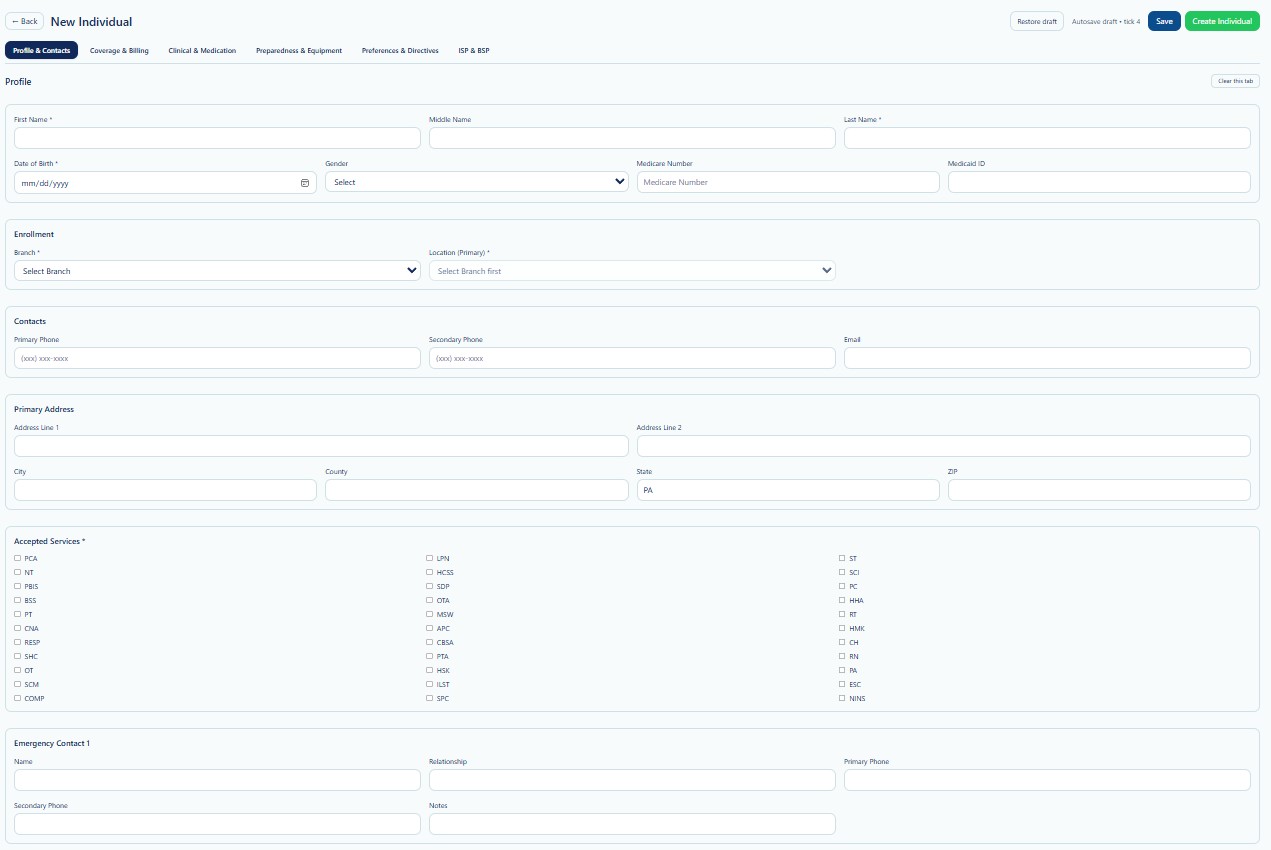
New Individual Tabs
| Tab | What Users Enter or Review | Documentation |
|---|---|---|
| 1. Profile & Contacts | Name, date of birth, gender, Medicare and Medicaid identifiers, branch, primary location, phone numbers, email, address, accepted services, and emergency contact information. | Open guide |
| 2. Coverage & Billing | Primary and secondary insurance, eligibility status, member or policy ID, group number, coverage dates, billing address, and guardian or representative payee. | Open guide |
| 3. Clinical & Medication | Primary care physician, medications, allergies, reactions, and diagnosis information. | Open guide |
| 4. Preparedness & Equipment | Priority code, mobility status, medical equipment, mobility devices, and other dependencies needed for emergency or continuity planning. | Open guide |
| 5. Preferences & Directives | Scheduling preferences, preferred days and time window, languages, caregiver gender preference, advanced directives, status, physician, and attachments or notes. | Open guide |
| 6. ISP & BSP | ISP plan status, service coordinator, outcomes, authorized services, health and safety information, BSP behaviors, triggers, prevention strategies, interventions, data collection, responsible team, and attachments. | Open guide |
The ISP & BSP section may require the Individual record to be created first. When prompted by the system, save or create the Individual, then reopen the record through Search Individual.
Search Individual
Search Individual is the primary screen for locating an existing Individual before reviewing or editing the record.
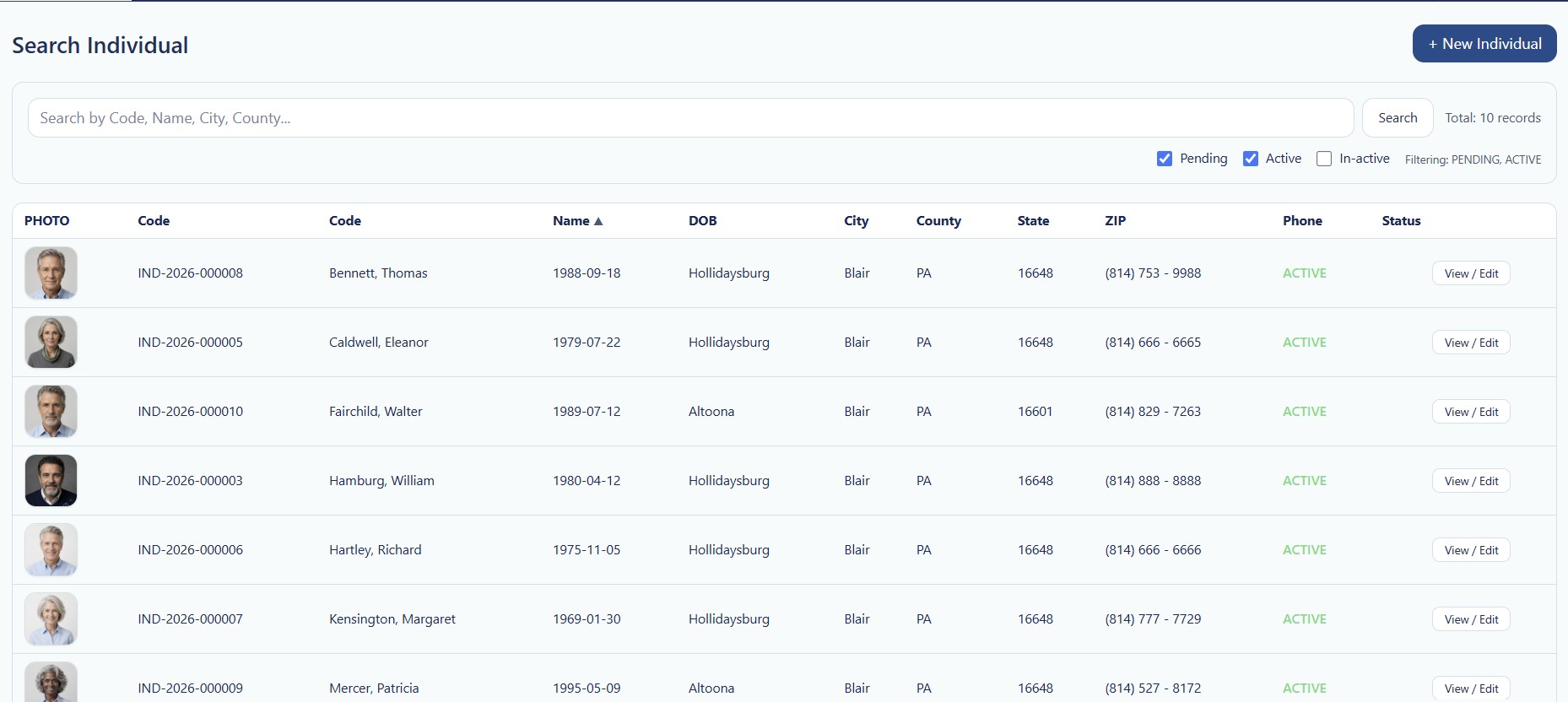
Available Search Functions
- Search by Individual code, name, city, or county.
- Filter records by Pending, Active, or In-active status.
- Review the total number of matching records.
- Sort or review Individual name and demographic columns.
- Select View / Edit to open the Individual Detail record.
- Select + New Individual to begin a new record.
Search Results
Search results may include photo, Individual code, name, date of birth, city, county, state, ZIP code, phone number, status, and the View/Edit action.
Individual Detail
Individual Detail is the ongoing record used after an Individual has been created. It provides access to operational, clinical, scheduling, authorization, financial, documentation, and service history areas.
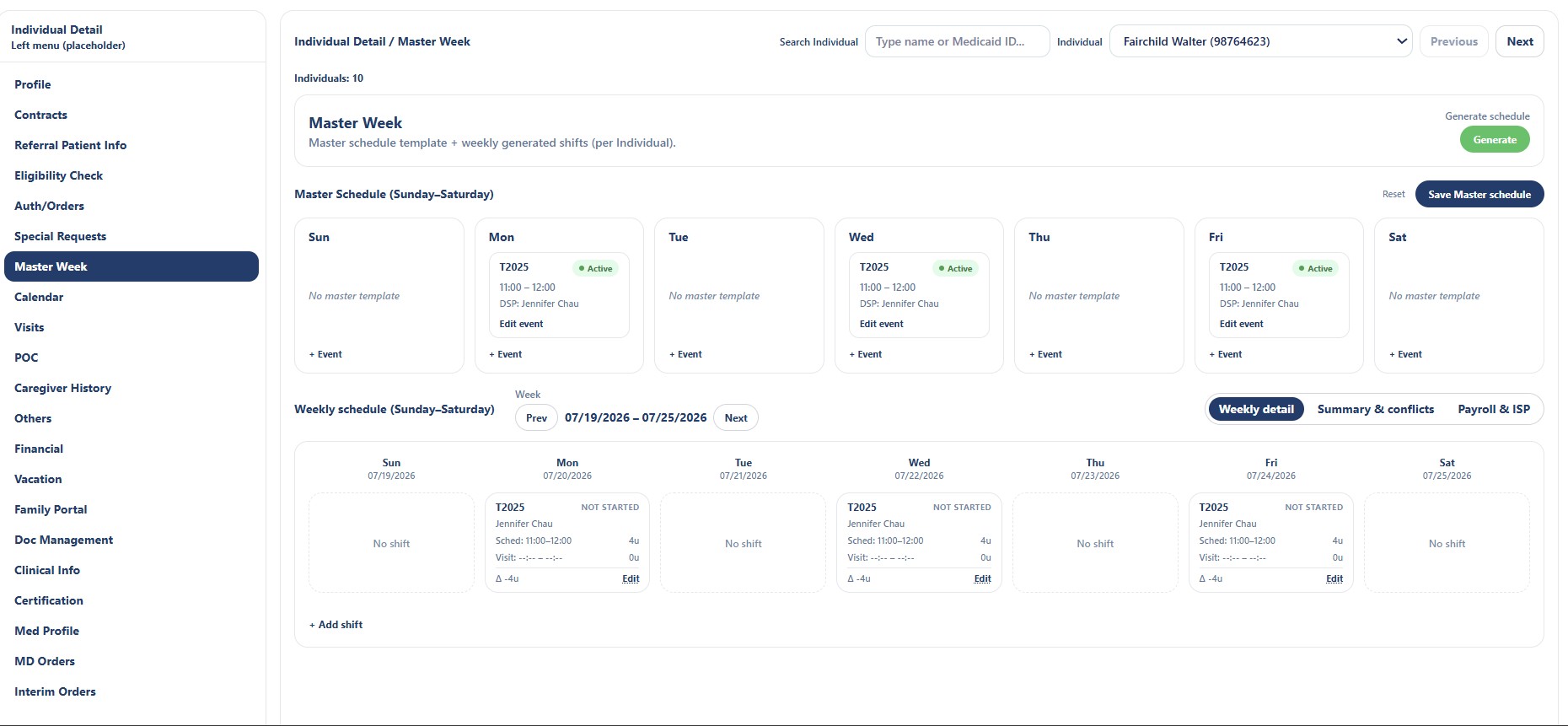
Individual Detail Navigation
| Area | Typical Use |
|---|---|
| Profile | Review and maintain core demographic information. |
| Contacts | Maintain Individual, guardian, emergency, and related contacts. |
| Referral Patient Info | Review referral or intake-related information. |
| Eligibility Check | Review payer or program eligibility information. |
| Auth/Orders | Review authorizations and applicable service orders. |
| Special Requests | Record important requests or service-specific instructions. |
| Master Week | Create the weekly service template and generate scheduled shifts. |
| Calendar | Review scheduled activities and service events. |
| Visits | Review completed, open, canceled, or scheduled visit records. |
| POC | Review or maintain Plan of Care information. |
| Caregiver History | Review caregivers who have served the Individual. |
| Others | Access additional Individual-specific information. |
| Financial | Review financial or payer-related record details. |
| Vacation | Record periods when services may be paused or unavailable. |
| Family Portal | Manage or review family portal participation and access. |
| Doc Management | Upload, organize, and review Individual documents. |
| Clinical Info | Review clinical details connected to the Individual. |
| Certification | Review certifications or required supporting records. |
| Med Profile | Review medication profile information. |
| MD Orders | Review physician or medical orders. |
| Interim Orders | Review temporary or interim order information. |
In normal use, staff locate the Individual through Search Individual, select View/Edit, and then use the Individual Detail navigation to maintain the record.
Recommended Documentation Order
The Individual documentation should follow the actual menu and screen sequence below.
Security and HIPAA
Individual records may contain protected health information and personally identifiable information. Access must be limited to authorized users with a legitimate business need.
- Use role-based access and the minimum necessary principle.
- Do not access an Individual record without an approved operational purpose.
- Do not share screenshots containing Individual information outside approved channels.
- Record access and changes through Audit Logs where applicable.
- Verify the correct Provider and Individual before editing information.