
PAYROLL • COMPENSATION OPERATIONS
Payroll
Manage employee rates, weekly payroll, payroll history, taxes, direct deposit, and Provider-specific payroll configuration.
Payroll pages may contain employee identity data, compensation rates, tax settings, bank-account metadata, payroll totals, and reporting information. Screenshots in this public guide use redacted or demonstration information. Access must be role-based, logged, and limited to the minimum information required for payroll, HR, finance, compliance, or authorized management duties.
True Care System provides configurable payroll workflows and reporting tools. Providers remain responsible for verifying current federal, state, and local tax rules, wage-and-hour requirements, overtime rules, filing obligations, banking requirements, employee classifications, and payroll outputs with qualified payroll, tax, legal, or accounting professionals.
Payroll Management Overview
The Payroll module brings together employee pay rates, approved work time, overtime, training hours, sick time, holiday time, PTO, mileage reimbursement, payroll generation, payroll history, tax reporting, direct deposit, and Provider-specific payroll tax settings.
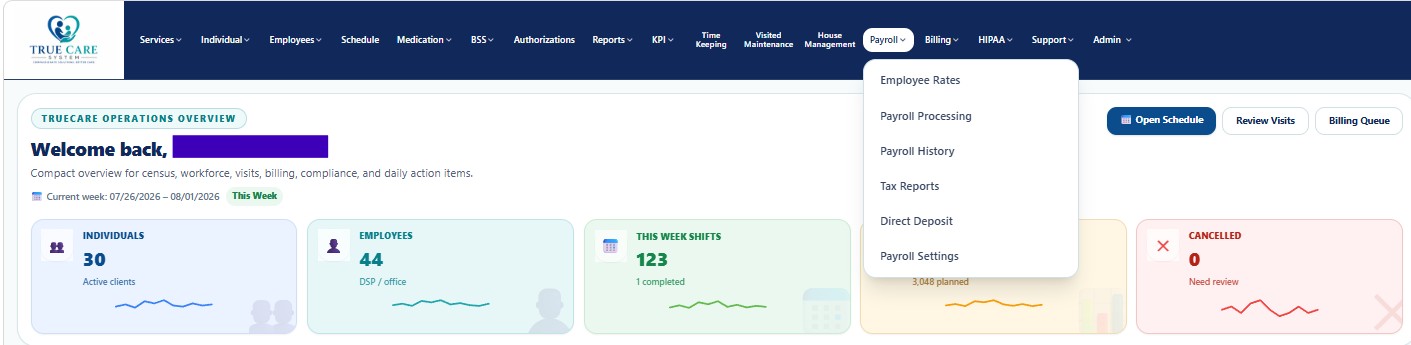
Payroll Workspaces
| Workspace | General Purpose | Documentation |
|---|---|---|
| Employee Rates | Configure base hourly rates, training rates, and mileage reimbursement rates used by Payroll Processing. | Open guide |
| Payroll Processing | Generate weekly payroll, review hours and units, calculate overtime, add approved extras, print, and export payroll documentation. | Open guide |
| Payroll History | Search, view, print, and export previously generated payroll periods. | Open guide |
| Tax Reports | Review tax liabilities by federal, state, local jurisdiction, employee, year, quarter, and reporting period. | Open guide |
| Direct Deposit | Manage employee bank accounts, account types, allocation methods, priorities, verification status, and effective dates. | Open guide |
| Payroll Settings | Configure general, federal, Social Security, Medicare, operating-state, local, unemployment, and other payroll-tax settings. | Open guide |
Recommended Payroll Workflow
- Configure Payroll Settings.
Set the Provider's payroll-tax scope, operating states, jurisdictions, employer accounts, rates, and effective dates.
- Maintain Employee Rates.
Confirm each employee's regular rate, training rate, and mileage reimbursement rate before payroll generation.
- Approve time sources.
Review office Time Keeping, DSP visit hours, schedule-linked work, approved BSS records, and other authorized time sources.
- Generate Payroll.
Select the weekly period, review hours, overtime, extras, and totals, then generate the payroll record.
- Review History and Reports.
Use Payroll History, Tax Reports, print outputs, and exports for verification and recordkeeping.
- Prepare Direct Deposit.
Confirm employee bank allocation, account status, verification, and effective dates before transmitting deposit instructions through an approved banking or payroll provider.