
BILLING • STEP 4
Sandata Submission
Submit EVV batches, track UUIDs and responses, resolve rejections, and preserve resubmission history.
Billing and EVV pages may contain PHI, Medicaid identifiers, employee identifiers, service information, visit dates, GPS evidence, claim-supporting data, and submission credentials. Screenshots in this public guide use redacted or demonstration information. Production access must be role-based, Provider-scoped, logged, and limited to the minimum information necessary.
True Care System has implemented the Sandata Alternate EVV workflow for Client, Employee, Visit, Call, correction, batching, transaction tracking, rejection review, and resubmission. The platform has completed the applicable Sandata testing and production-onboarding work for its certified payer program. Sandata certification is program-specific; availability in another state or payer program requires that program's registration, testing, approval, credentials, and current technical specifications.
True Care System sends required EVV data to the Sandata Aggregator. After accepted EVV submission, the Provider completes the Medicaid billing or claim workflow through the applicable state claims system, such as Pennsylvania PROMISe, unless the payer program specifies a different process.
Purpose
Sandata Submission manages EVV batches created from Visit Review. It provides controlled submission to UAT or Production, request inspection, transaction UUID tracking, response monitoring, rejection review, correction history, and resubmission.
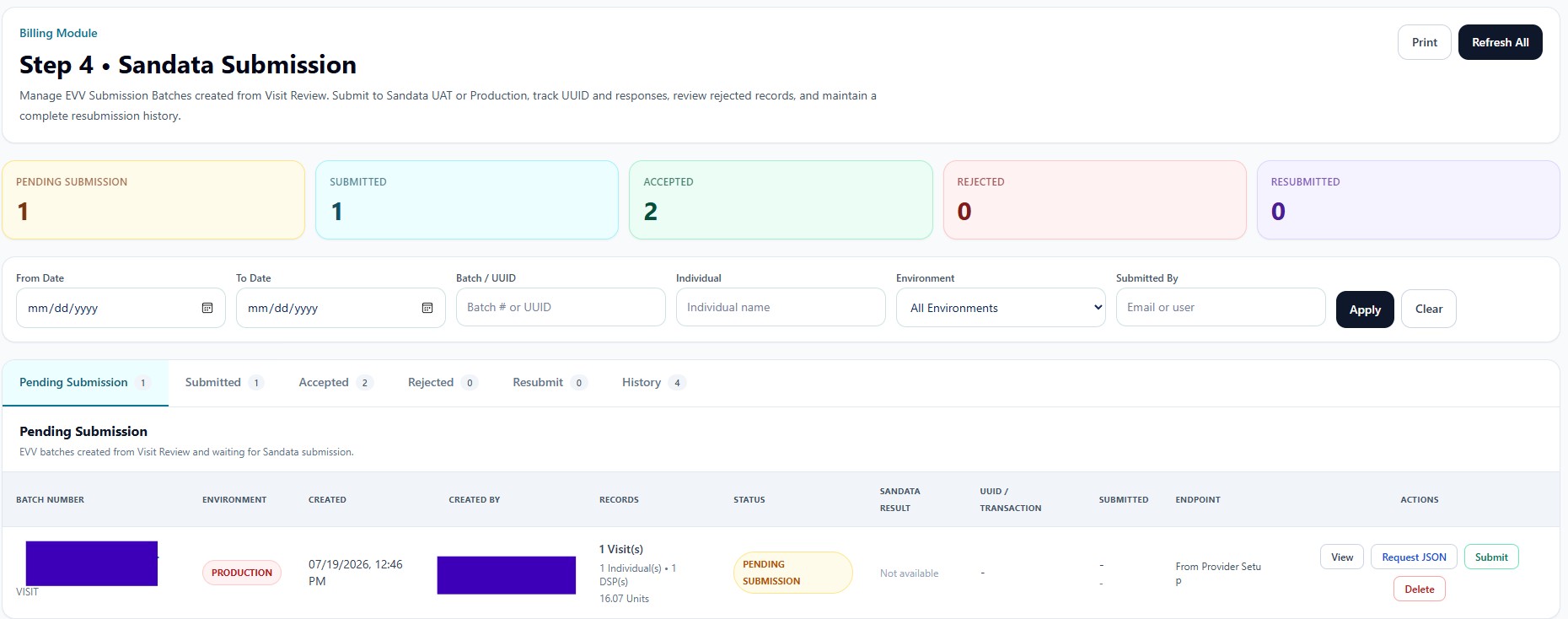
Header Actions and Lifecycle Cards
| Control | Function |
|---|---|
| Prints the current submission-management view. | |
| Refresh All | Reloads batches and available Sandata transaction statuses. |
| Pending Submission | Batches created but not yet transmitted. |
| Submitted | Batches received for processing but not yet finalized. |
| Accepted | Batches or records accepted by Sandata. |
| Rejected | Batches or records requiring correction. |
| Resubmitted | Corrected submissions sent again with preserved history. |
Filters and Tabs
From Date, To Date, Batch/UUID, Individual, Environment, and Submitted By allow targeted transaction review. Apply runs the filter and Clear resets it. Tabs separate Pending, Submitted, Accepted, Rejected, Resubmit, and complete History views.
Batch Information
Each batch displays batch number, environment, creation date, creator, record counts, status, Sandata result, UUID/transaction identifier, submitted time, endpoint source, and actions. Record summaries can include Visit count, Individual count, DSP count, and total units.
Batch Actions
| Action | Function |
|---|---|
| View | Opens the batch and record-level details. |
| Request JSON | Displays the outgoing request payload for authorized technical or compliance review. |
| Submit | Sends the pending batch to the environment and endpoint defined in Provider Setup. |
| Delete | Removes an eligible pending batch before submission; submitted history must remain protected. |
| Resubmit | Sends corrected records while preserving the original transaction and rejection trail. |
Transaction Governance
The system should preserve batch creation, payload version, environment, endpoint, creator, submitter, timestamps, UUID, response summary, record-level errors, corrections, and resubmission relationships. Credentials are never displayed in transaction tables.