
BILLING • RATE MANAGEMENT
Service Rates
Configure effective-dated Provider reimbursement rates by payer, service, ratio, level, zone, and unit format.
Billing and EVV pages may contain PHI, Medicaid identifiers, employee identifiers, service information, visit dates, GPS evidence, claim-supporting data, and submission credentials. Screenshots in this public guide use redacted or demonstration information. Production access must be role-based, Provider-scoped, logged, and limited to the minimum information necessary.
True Care System has implemented the Sandata Alternate EVV workflow for Client, Employee, Visit, Call, correction, batching, transaction tracking, rejection review, and resubmission. The platform has completed the applicable Sandata testing and production-onboarding work for its certified payer program. Sandata certification is program-specific; availability in another state or payer program requires that program's registration, testing, approval, credentials, and current technical specifications.
True Care System sends required EVV data to the Sandata Aggregator. After accepted EVV submission, the Provider completes the Medicaid billing or claim workflow through the applicable state claims system, such as Pennsylvania PROMISe, unless the payer program specifies a different process.
Purpose
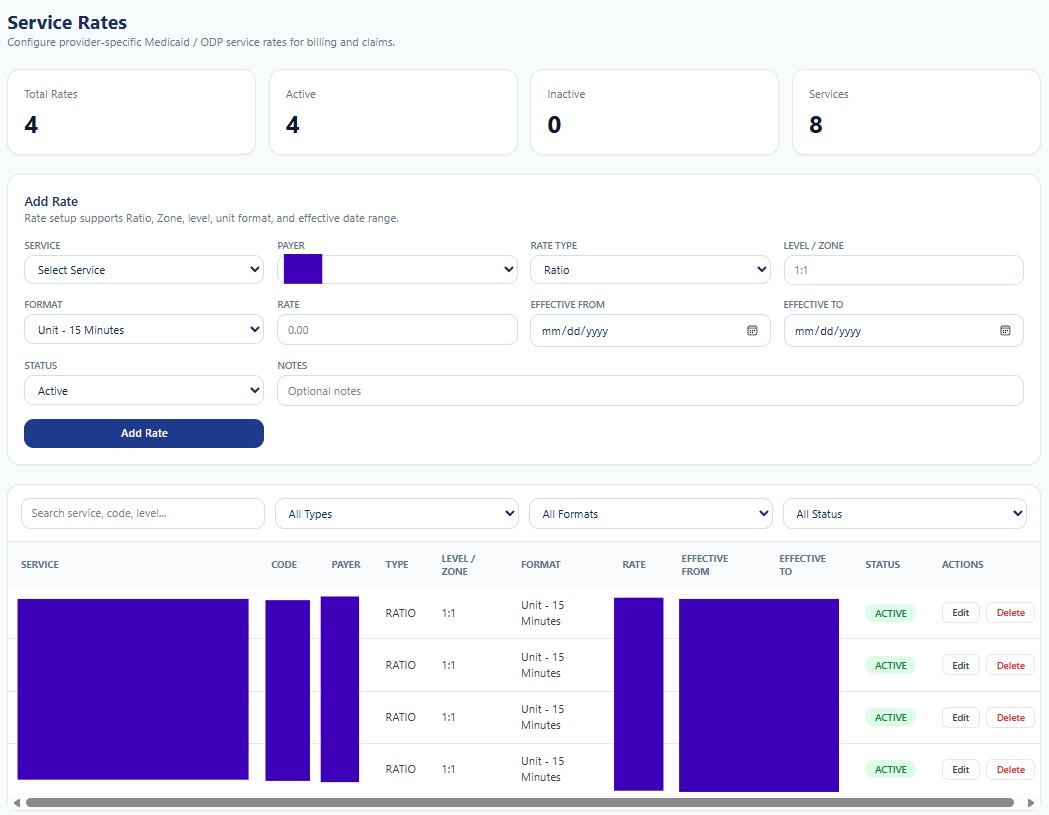
Service Rates maintains Provider-specific Medicaid or program rates used for billing calculations and claim-supporting reports. Rates are effective-dated and can vary by payer, service, ratio, level, zone, and unit format.
Summary Cards
| Card | Function |
|---|---|
| Total Rates | Total configured service-rate records. |
| Active | Rates available for the current effective period. |
| Inactive | Rates retained for history but not available for new calculations. |
| Services | Number of services represented by the rate configuration. |
Add Rate Fields
| Field | Function |
|---|---|
| Service | Selects the Provider service associated with the rate. |
| Payer | Selects the payer responsible for the service reimbursement rule. |
| Rate Type | Defines whether the rate is based on ratio, zone, level, or another supported classification. |
| Level / Zone | Stores the service level, staffing ratio, geographic zone, or related qualifier. |
| Format | Defines the billable unit format, such as one unit per 15 minutes. |
| Rate | Stores the reimbursement amount for the selected unit and configuration. |
| Effective From / Effective To | Controls the period during which the rate may be applied. |
| Status | Marks the rate Active or Inactive. |
| Notes | Stores authorized internal context for the rate configuration. |
| Add Rate | Creates the completed effective-dated rate record. |
Search, Filters, and Actions
The list can be searched by service, code, or level and filtered by rate type, format, and status. Columns display Service, Code, Payer, Type, Level/Zone, Format, Rate, Effective From, Effective To, Status, and Actions. Edit updates a permitted record. Delete should be restricted when the rate has already been used; historical rates should normally be inactivated rather than removed.
Rate Governance
Billing rates are not employee payroll rates. Provider reimbursement configuration must be verified against the applicable payer contract, fee schedule, authorization, service code, modifiers, level, ratio, unit definition, and effective dates. Overlapping active rates for the same combination should be prevented or explicitly resolved.