
AUTHORIZATION MANAGEMENT
Authorization Records
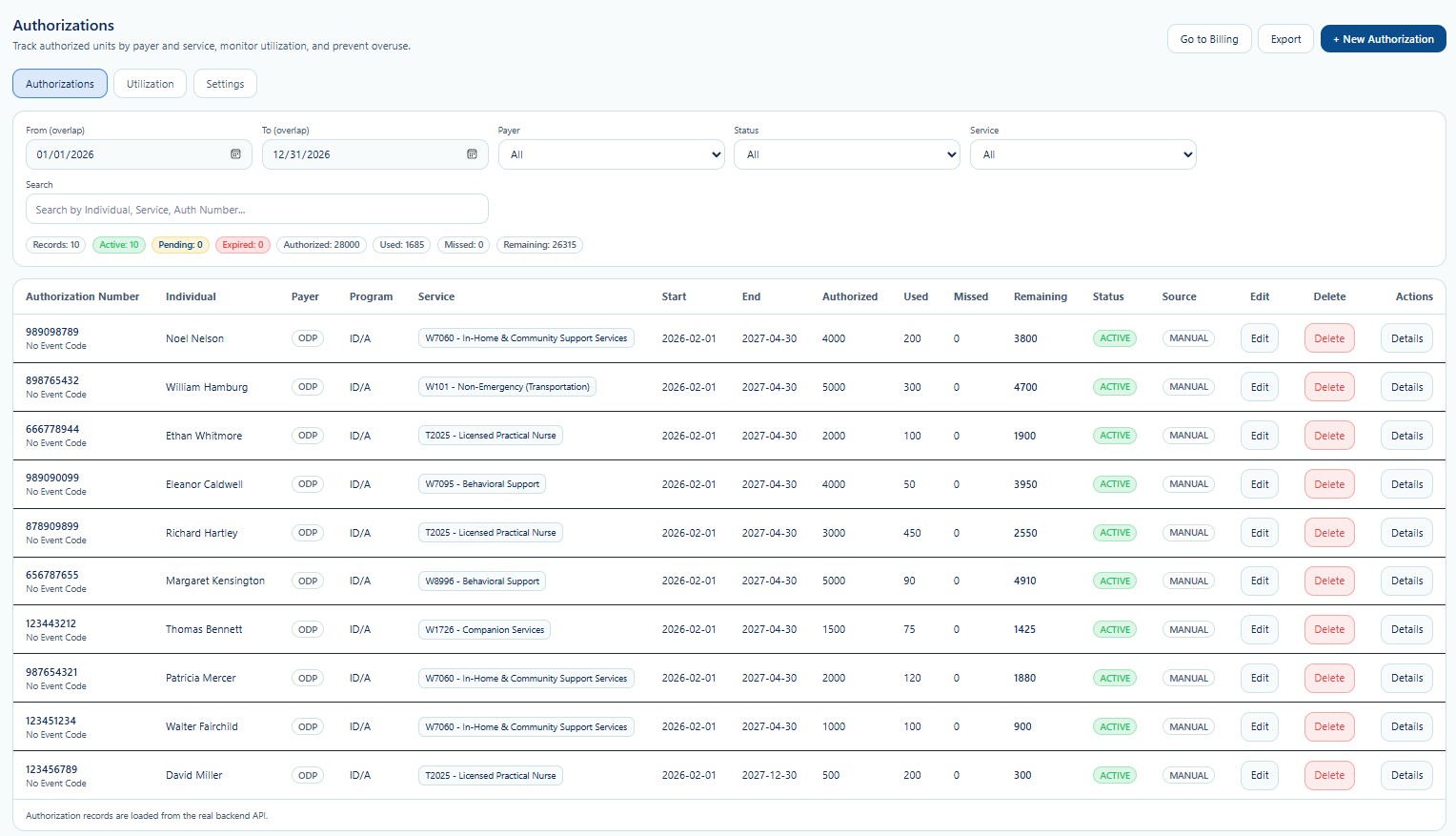
Authorization Records is the primary workspace for reviewing and maintaining payer-approved services for each Individual. It brings together authorization number, payer, program, service, effective dates, authorized limits, utilization values, status, source, and available record actions.
Authorization Records Screen
Use this screen to locate active, pending, expired, or historical authorization records. Filters should be applied before editing or opening a record to reduce the risk of selecting the wrong Individual, payer, service, or authorization period.
Page Functions
| Function | Detailed Use |
|---|---|
| From / To | Limits results to authorization periods that overlap the selected date range. Use this when reviewing current, future, or historical authorizations. |
| Payer | Filters records by payer or funding source. This helps staff separate program-specific authorization activity. |
| Status | Filters by authorization state such as Active, Pending, Expired, or other configured statuses. |
| Service | Filters records by the Provider-configured service and billing code. |
| Search | Searches by Individual name, service, authorization number, or other supported record text. |
| Summary Badges | Displays the current result count and aggregate totals for active, pending, expired, authorized, used, missed, and remaining values. |
| Go to Billing | Opens the billing workflow. Staff should resolve authorization discrepancies before preparing claims or billing batches. |
| Export | Exports the current authorization data for approved operational, payer, compliance, or audit use. |
| + New Authorization | Opens the New Authorization workflow for creating a new payer-approved service record. |
Authorization Results Columns
| Column | Meaning |
|---|---|
| Authorization Number | The payer or program authorization identifier. Event-code information may appear beneath the number when configured. |
| Individual | The person approved to receive the authorized service. |
| Payer / Program | The funding source and program associated with the authorization. |
| Service | The Provider service and billing code connected to the record. |
| Start / End | The effective period during which the authorization may be used. |
| Authorized | The approved maximum quantity for the authorization period. |
| Used | The quantity already consumed by qualifying service activity. |
| Missed | The quantity tracked as missed when applicable under the Provider workflow. |
| Remaining | The available balance after used and missed values are applied according to system rules. |
| Status | The current authorization lifecycle status. |
| Source | Shows whether the record was entered manually or originated from another configured source. |
Record Actions
Updates approved fields such as dates, status, service lines, comments, limits, or historical values based on the user’s role.
Removes a record only when deletion is permitted. Deletion should not be used for records already connected to service history, billing, or audit requirements.
Opens the complete authorization record for review, validation, and maintenance.
Recommended Review Process
- Confirm the Provider and Individual.
Verify that the record belongs to the correct tenant and person. - Review payer and service.
Confirm the payer, program, service code, and authorization number. - Validate dates and status.
Confirm the authorization is active for the intended service period. - Review utilization.
Compare authorized, used, missed, and remaining values. - Resolve discrepancies before billing.
Correct data issues before claims or billing reports are prepared.
HIPAA and Proprietary Workflow
Authorization records may contain payer identifiers, Medicaid or Medicare information, service needs, utilization history, and financial information. Access must follow role-based access and the minimum necessary standard.
Some automated utilization rules, schedule and visit reconciliation, missed-unit logic, overuse safeguards, billing validation, and payer-specific exception handling are not published in this public guide. These proprietary and compliance-sensitive functions are covered during direct training for official Provider customers.