
AUTHORIZATION MANAGEMENT
New Authorization
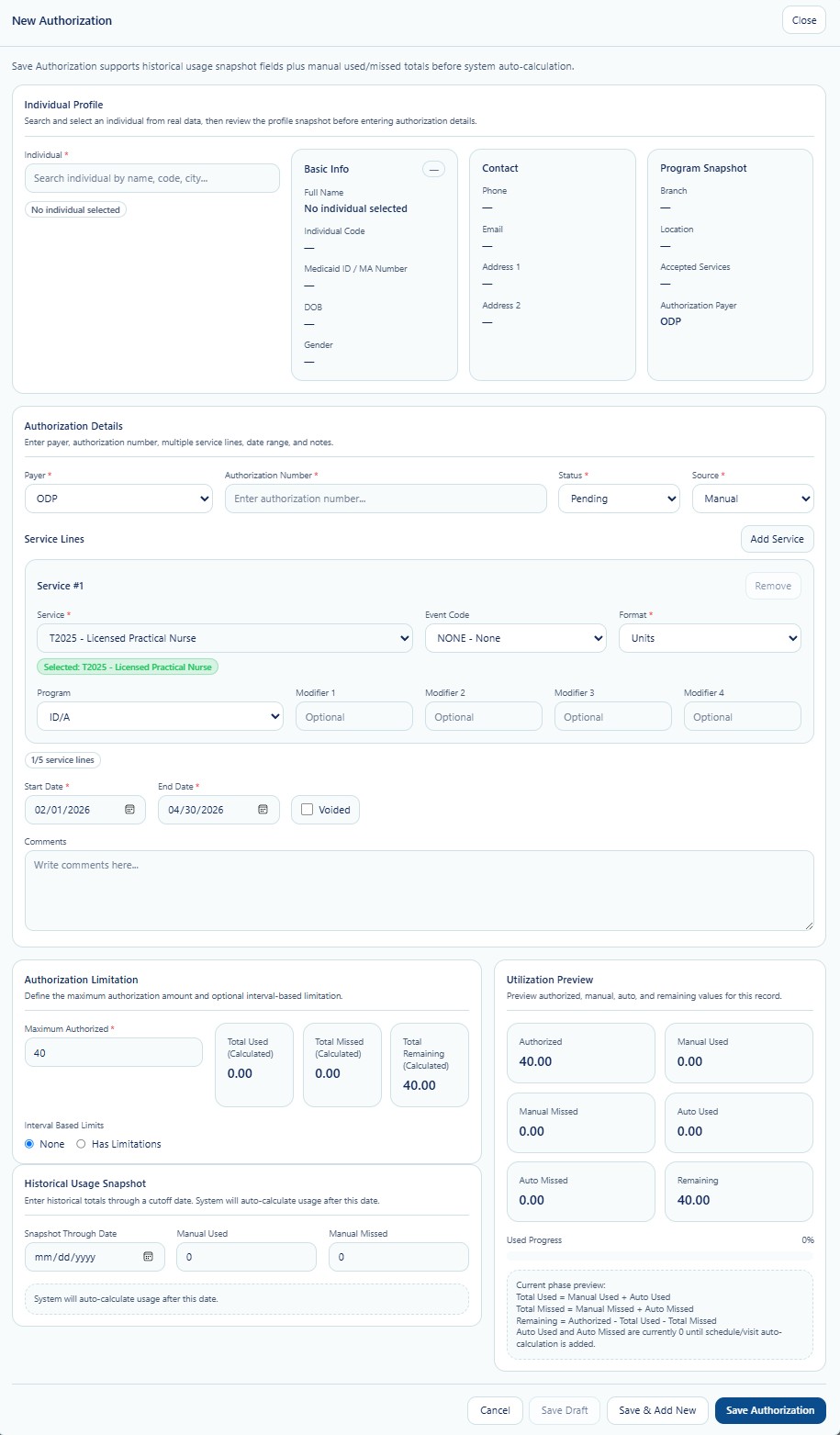
New Authorization is used to establish a payer-approved service record for an Individual. The workflow combines the Individual profile snapshot, authorization identity, one or more service lines, effective dates, maximum approved amount, historical usage, and a utilization preview.
New Authorization Screen
Creation Workflow
Search and select the correct Individual, then review the profile, contact, branch, location, accepted services, and payer snapshot.
Enter payer, authorization number, status, source, effective dates, and comments.
Select the approved service, event code, format, program, and modifiers. Multiple service lines may be supported.
Enter the maximum authorized quantity and any configured interval-based limitations.
When implementation requires a cutover, enter the snapshot-through date and approved historical used or missed values.
Validate the utilization preview, then save, save and add another, or save a draft when available.
Individual Profile Section
| Field | Function |
|---|---|
| Individual Search | Searches by supported Individual identifiers such as name, code, or city. |
| Basic Info | Displays name, Individual code, Medicaid or MA number, date of birth, and gender. |
| Contact | Displays phone, email, and address information for verification. |
| Program Snapshot | Displays branch, location, accepted services, and authorization payer context. |
Authorization Details
| Field | Detailed Use |
|---|---|
| Payer | Selects the funding source responsible for the authorization. |
| Authorization Number | Stores the payer-issued identifier. Verify the exact value before saving. |
| Status | Defines the current lifecycle state, such as Pending or Active. |
| Source | Identifies whether the record was entered manually or originated from another configured source. |
| Service | Selects the Provider-configured service and billing code. |
| Event Code | Stores an applicable event or program code when required. |
| Format | Defines the authorization measurement format, such as units. |
| Program | Associates the service line with the applicable payer program. |
| Modifiers | Stores optional service modifiers when required by the payer or service setup. |
| Start / End Date | Defines the authorization’s effective service period. |
| Voided | Marks the record as voided when permitted by policy. Do not use this as a substitute for correcting the wrong record. |
| Comments | Stores approved operational context that does not belong in another field. |
Authorization Limitation and Utilization Preview
Authorization Limitation
Maximum Authorized defines the approved service quantity.
Interval-Based Limits may restrict usage by an additional configured period.
Historical Usage Snapshot
Snapshot Through Date identifies the historical cutover point.
Manual Used / Missed stores approved pre-system totals.
Utilization Preview
Reviews authorized, manual used, manual missed, auto used, auto missed, remaining, and current utilization percentage before saving.
Save Controls
| Control | Use |
|---|---|
| Cancel | Closes the workflow without creating the authorization. Unsaved changes may be lost. |
| Save Draft | Saves incomplete work when draft behavior is enabled. |
| Save & Add New | Saves the current authorization and opens a new blank workflow. |
| Save Authorization | Validates and creates the authorization record. |
Validation Checklist
- Correct Provider and Individual selected.
- Payer and authorization number match the official payer document.
- Service, program, format, event code, and modifiers are correct.
- Start and end dates match the approved authorization period.
- Maximum authorized amount is entered in the correct measurement format.
- Historical usage is entered only from an approved source.
- Utilization preview is reviewed before saving.
HIPAA and Proprietary Workflow
This workflow may expose PHI, payer identifiers, Medicaid or Medicare information, service needs, and financial data. Staff must verify the correct Individual and use only approved channels for supporting documents and exports.
Detailed service-line validation, historical cutover rules, automatic usage calculation, missed-service logic, schedule and visit matching, and billing safeguards are intentionally not published in full. These proprietary functions are trained directly to authorized staff of official True Care System Provider customers.