
GETTING STARTED
Forgot Password
The Forgot Password feature allows users to securely request a password reset when they cannot remember their current password. The process consists of opening the Forgot Password window and requesting a secure password reset link.
Prerequisites
- Active True Care System user account.
- Access to the registered email address.
- Internet connection.
Step 1 — Open Forgot Password
On the Login page, click the Forgot Password? button. The system will open the Password Reset window.
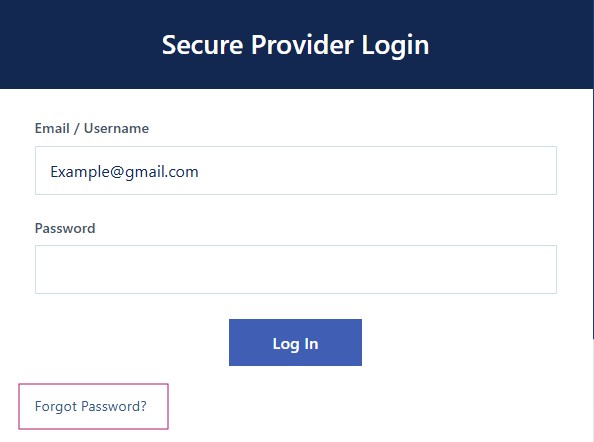
Figure 1. Click "Forgot Password?" on the Login page.
- Open the Login page.
- Click Forgot Password?.
- The Password Reset window appears.
Step 2 — Request Password Reset
Enter the email address associated with your account and click Send Reset Link. If the email exists in the system, a secure password reset email will be sent.
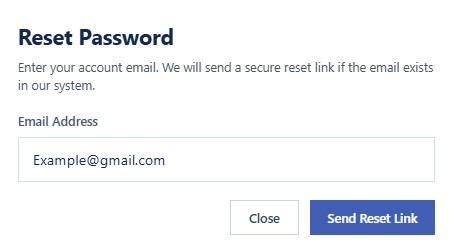
Figure 2. Request Password Reset Link.
- Enter your registered Email Address.
- Click Send Reset Link.
- Check your email inbox.
- Open the password reset email.
- Follow the instructions to create a new password.
- Return to the Login page and sign in using your new password.
Successful Password Reset
- Password reset email is successfully sent.
- User creates a new password.
- The new password becomes active immediately.
- User can log in using the new password.
Security
- Password reset links are secure.
- Only registered email addresses can request a password reset.
- Never share your password reset email with anyone.
- Use a strong password when creating a new password.
HIPAA Considerations
- Keep your account credentials confidential.
- Never allow another person to reset your password.
- Always create a unique and secure password.
- Protect Protected Health Information (PHI) after logging in.
Troubleshooting
- Verify that the email address is correct.
- Check your Spam or Junk folder.
- Wait a few minutes for the email to arrive.
- If no email is received, contact your Provider Administrator.
Frequently Asked Questions
I didn't receive the reset email.
Check your Spam or Junk folder first. If the email still cannot be found, contact your Provider Administrator.
Can I use my old password?
No. After resetting your password, you must use the newly created password.
Is the reset link permanent?
No. For security purposes, password reset links expire after a limited period.