
SECURITY • PRIVACY • ACCOUNTABILITY
Password Policy
Privacy and public-documentation notice
Security and HIPAA screens may contain workforce identity, Provider information, IP addresses, access history, support-session data, and protected health information. Screenshots in this guide use masked, redacted, or demonstration content. Unmasked content should be treated as authorized demo data only.
Purpose
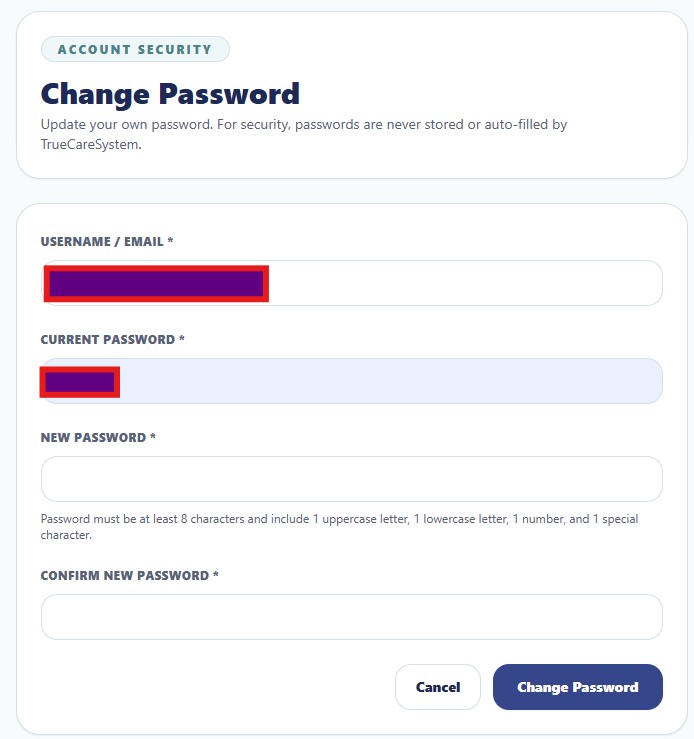
The Change Password workspace allows an authenticated user to replace an existing password without displaying or auto-filling stored credentials.
Field Guide
| Field | Function |
|---|---|
| Username / Email | Identifies the account whose password is being updated. |
| Current Password | Confirms that the authenticated person knows the existing credential. |
| New Password | Accepts the replacement password under the displayed complexity requirements. |
| Confirm New Password | Prevents accidental password entry errors. |
| Change Password | Submits the validated password update. |
Password Requirements Shown in the Application
The displayed rule requires at least eight characters and includes at least one uppercase letter, one lowercase letter, one number, and one special character.
Security Practices
- Use a unique password that is not reused on personal services.
- Do not send passwords through email, text, tickets, or chat.
- Change a password immediately when compromise is suspected.
- Use administrative reset only through authorized workflows.