
SERVICE MANAGEMENT
Service Management – Overview
The Service Management module establishes the standardized service structure used throughout the True Care System. Each service defines how care is configured, scheduled, authorized, delivered, verified, documented, billed, reported, and reviewed across the organization.
A properly configured service supports consistent operations and helps providers align service delivery with approved programs, payer requirements, procedure codes, authorization limits, Electronic Visit Verification (EVV), billing rules, payroll, reporting, and applicable privacy and compliance obligations.
Service as the Operational Foundation
Services are not isolated records. They provide the operational foundation that connects multiple True Care System modules and workflows.
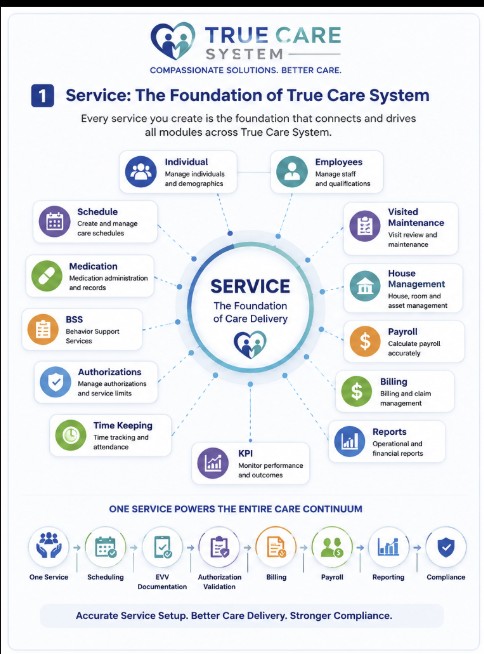
Figure 1. A configured service connects the primary operational modules of the True Care System.
Primary Objectives
Service Management provides a consistent framework for creating and maintaining services used throughout the organization.
- Standardize service names, programs, procedure codes, rates, units, and billing rules.
- Connect service configuration with individual authorizations and scheduled care.
- Support accurate EVV, visit verification, billing, payroll, and reporting.
- Reduce inconsistent or duplicate service definitions.
- Help administrators maintain controlled and reviewable service configuration.
- Support payer, program, operational, security, and compliance requirements.
Functions Supported Across the System
Service records may be referenced throughout the following operational areas:
- Individual service planning and authorization.
- Employee scheduling and assignment.
- Mobile EVV check-in and check-out.
- Visit Maintenance and visit correction workflows.
- Behavioral Support Services documentation.
- Authorization unit tracking.
- Billing and Sandata submission preparation.
- Payroll and compensated service-hour calculation.
- Operational, management, compliance, and audit reporting.
Complete Service Lifecycle
A service moves through a controlled lifecycle from initial configuration to care delivery, verification, billing, payroll, reporting, and compliance review.
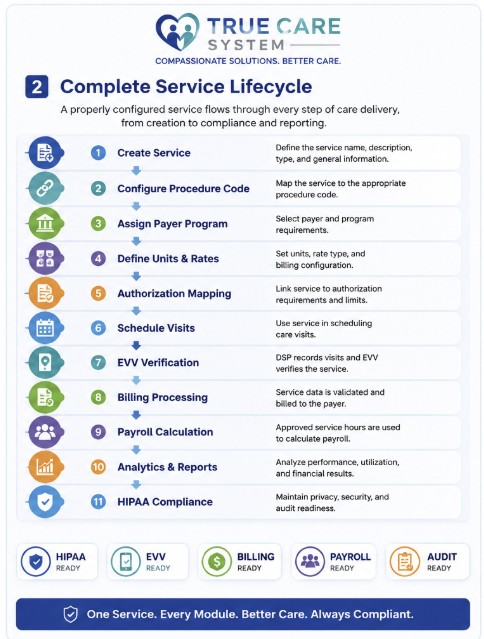
Figure 2. The service lifecycle from configuration through compliance and reporting.
Typical Service Workflow
- An authorized administrator creates the service.
- The administrator defines the service name, program, procedure code, unit type, rate, billing rules, and status.
- The service is assigned to eligible individuals and connected to approved authorizations.
- Authorized employees are scheduled to deliver the service.
- Service delivery is recorded through EVV, visit records, and required documentation.
- Completed visits are reviewed for time, units, authorization, documentation, and billing readiness.
- Approved service records support billing, payroll, reporting, audit review, and compliance monitoring.
Standards and Compliance
Service configuration should remain consistent with the provider's approved programs, payer requirements, internal policies, and applicable regulatory obligations.
- Use approved service names and procedure codes.
- Confirm the correct payer and program association.
- Configure the correct unit type and billing calculation.
- Verify that service dates and authorization limits are valid.
- Protect Protected Health Information (PHI) and apply minimum necessary access.
- Maintain accurate records for operational, billing, security, and audit review.
Before Creating a Service
Collect and verify the required information before creating a new service.
- Official service name.
- Program or waiver.
- Payer.
- Procedure code.
- Unit type and unit calculation.
- Service rate.
- Billing rules.
- EVV requirements.
- Effective date.
- Service status.
Avoid creating duplicate services for the same program, procedure code, unit structure, and operational purpose. Search existing services before creating a new record.
Important Considerations
- Changes to a service may affect scheduling, authorizations, EVV, billing, payroll, and reporting.
- Do not change a procedure code or billing rule without reviewing existing authorizations and historical service records.
- Inactive services should remain available for historical review when they have already been used.
- Only authorized users should create, modify, activate, or deactivate services.
- Review configuration carefully before using the service in production workflows.
Troubleshooting
- Search existing services if a service appears to be missing.
- Confirm that the service is active.
- Verify the user's role and service-management permissions.
- Confirm that the correct program, procedure code, unit type, and payer are configured.
- Review individual authorization dates and available units.
- Refresh the page after recent service changes.
- Contact the Provider Administrator or Platform Support if the issue continues.
Frequently Asked Questions
Why is Service Management important?
Service Management provides the standardized service definitions used by scheduling, authorization, EVV, billing, payroll, reporting, and compliance workflows.
Should I create a new service when a similar service already exists?
Review the existing service first. Create a new service only when the program, procedure code, rate, unit structure, billing rule, or operational purpose requires a separate configuration.
Can an active service be changed?
Authorized users may update a service, but changes should be reviewed carefully because they may affect current and future operational workflows.
What happens when a service is made inactive?
The service should no longer be available for new operational use, while historical records remain available for review and reporting.