
SCHEDULE MANAGEMENT
Master & Weekly Schedule
Connect recurring Master Schedule templates with generated weekly shifts for a selected Individual.
This guide presents the general purpose and standard user flow of this feature. To protect the proprietary scheduling methodology and operational processes developed by True Care System, selected advanced procedures are intentionally not published in full. Official Provider customers receive direct onboarding and role-based training from the True Care System team after becoming active customers.
Workspace Overview
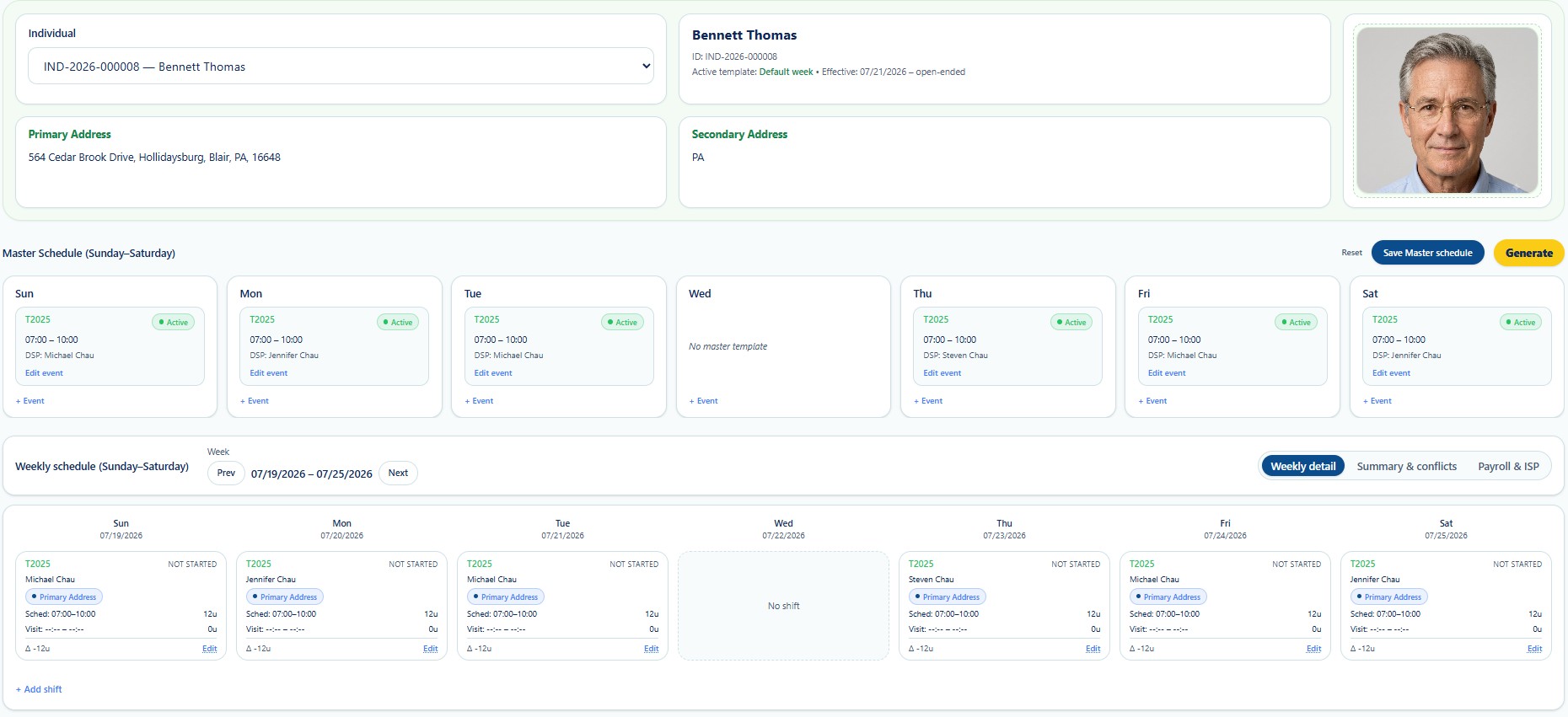
Standard Scheduling Sequence
Confirm the correct Individual, ID, template, and service address.
Review recurring Sunday-through-Saturday events.
Save approved service, DSP, day, and time changes.
Create weekly shifts from the saved template.
Review service, DSP, address, units, and status.
Use Weekly Detail and Summary & Conflicts.
Visible Functions
| Function | General Use |
|---|---|
| Individual Selector | Opens the schedule for the correct Individual. |
| Master Schedule | Stores recurring service events. |
| Generate | Creates weekly shifts from the saved template. |
| Weekly Detail | Reviews scheduled and actual units. |
| Summary & Conflicts | Reviews overlaps and exceptions. |
| Payroll & ISP | Supports unit and staffing comparison. |
Training Scope
Direct Provider training covers schedule-generation strategy, recurring-template governance, staffing recovery, unit reconciliation, and advanced conflict resolution.