
SCHEDULE MANAGEMENT
Monthly Calendar
Provide a month-level overview of scheduled shifts, assigned DSPs, times, and status indicators.
This guide presents the general purpose and standard user flow of this feature. To protect the proprietary scheduling methodology and operational processes developed by True Care System, selected advanced procedures are intentionally not published in full. Official Provider customers receive direct onboarding and role-based training from the True Care System team after becoming active customers.
Calendar Overview
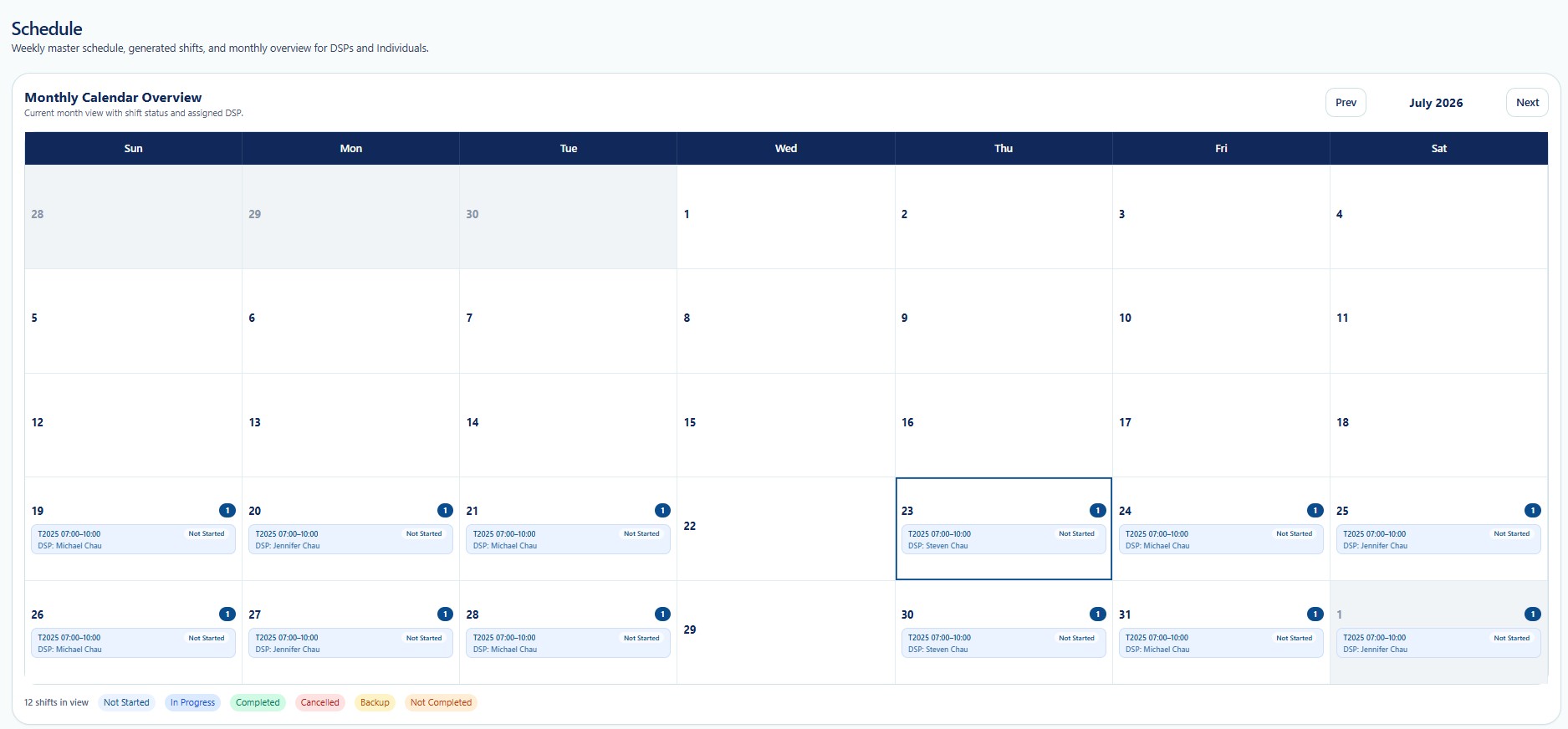
What Users Can Review
Review how many shifts are visible in the selected month.
Review assigned DSPs and service times by date.
Identify Not Started, In Progress, Completed, Cancelled, Backup, and Not Completed shifts.
Identify dates requiring staffing or operational follow-up.
Calendar Controls
| Control | General Use |
|---|---|
| Prev / Next | Moves between months. |
| Date Cell | Displays shifts for the date. |
| Status Badge | Shows the current shift state. |
| Shift Count | Shows how many shifts exist on the date. |
Training Scope
Direct Provider training covers monthly staffing review, coverage-gap escalation, exception prioritization, and management follow-up.