
SUPPORT • PROVIDER GOVERNANCE
All Provider Tickets
Review every ticket available within the authenticated Provider and supervise access, assignment, communication, and closure.
Support tickets may contain PHI, screenshots, operational records, user identities, device details, IP addresses, and troubleshooting evidence. Public screenshots in this guide use redacted or demonstration information. Users must not place passwords, full Social Security numbers, complete payment-card information, or unrelated PHI in a ticket.
True Care System assigns every ticket a unique Provider-scoped ticket number, preserves ticket conversations and attachments, records support-access approval and expiration, and logs each authorized support or impersonation session. The audit trail is designed to show who requested access, who approved it, when access began and ended, which Provider was entered, and what actions were performed during the support session.
Purpose
All Provider Tickets displays every support ticket available under the authenticated Provider. The backend API restricts Provider users to their own Provider. Access to the complete register should be limited to roles with support-management authority.
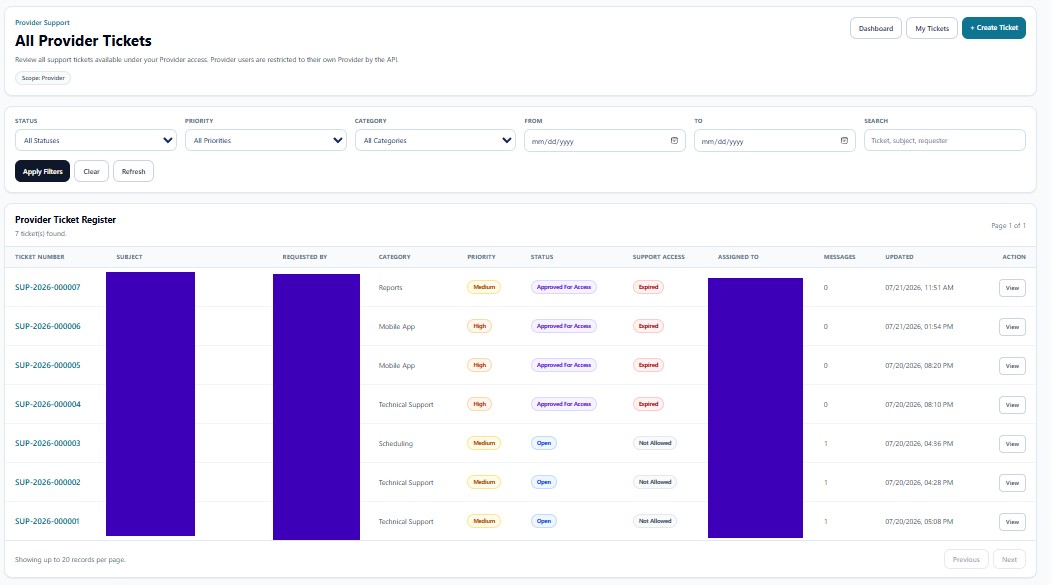
Scope and Navigation
| Control | Function |
|---|---|
| Scope: Provider | Confirms that results are restricted to the current Provider. |
| Dashboard | Returns to the Support Dashboard. |
| My Tickets | Displays only tickets created by the signed-in user. |
| + Create Ticket | Creates a new Provider-scoped ticket. |
Filters
Status, Priority, Category, From, To, and Search controls help Provider Admins and authorized support managers isolate specific cases. Apply Filters runs the selected criteria, Clear removes them, and Refresh reloads the Provider ticket register.
Provider Ticket Register
| Column | Function |
|---|---|
| Ticket Number | Unique, permanent ticket identifier assigned automatically. |
| Subject | Issue summary. |
| Requested By | Authenticated Provider user who created the request. |
| Category | Support classification. |
| Priority | Low, Medium, High, or Urgent impact. |
| Status | Current support workflow state. |
| Support Access | Shows Not Allowed, Approved, Active, Expired, or another configured access state. |
| Assigned To | Current Platform Support owner. |
| Messages | Ticket-conversation count. |
| Updated | Latest ticket activity. |
| View | Opens the complete ticket record and audit-linked support history. |
Temporary Support Access and Session Logging
Approved support access does not create unrestricted or permanent access. It is tied to the ticket, the approving Provider user, and the expiration time. When Platform Support enters the Provider environment, True Care System records the support or impersonation session. The session history should preserve the ticket number, session ID, support actor, target Provider, start time, end time, approval status, and actions performed during the session.
HIPAA Review Expectations
- Confirm that access was approved before any Provider environment was entered.
- Verify that the approval had not expired.
- Review all session actions against the stated ticket purpose.
- Confirm that only the minimum necessary PHI was accessed.
- End the session promptly and preserve the start/end audit events.
- Close the ticket only after the Provider has received the resolution and access is no longer required.