
SUPPORT • REQUESTER TRACKING
My Tickets
View and track support tickets created by the signed-in user.
Support tickets may contain PHI, screenshots, operational records, user identities, device details, IP addresses, and troubleshooting evidence. Public screenshots in this guide use redacted or demonstration information. Users must not place passwords, full Social Security numbers, complete payment-card information, or unrelated PHI in a ticket.
True Care System assigns every ticket a unique Provider-scoped ticket number, preserves ticket conversations and attachments, records support-access approval and expiration, and logs each authorized support or impersonation session. The audit trail is designed to show who requested access, who approved it, when access began and ended, which Provider was entered, and what actions were performed during the support session.
Purpose
My Tickets displays support requests created by the signed-in user. It is the personal tracking workspace for reviewing status, priority, assignment, messages, updates, and the current support-access state.
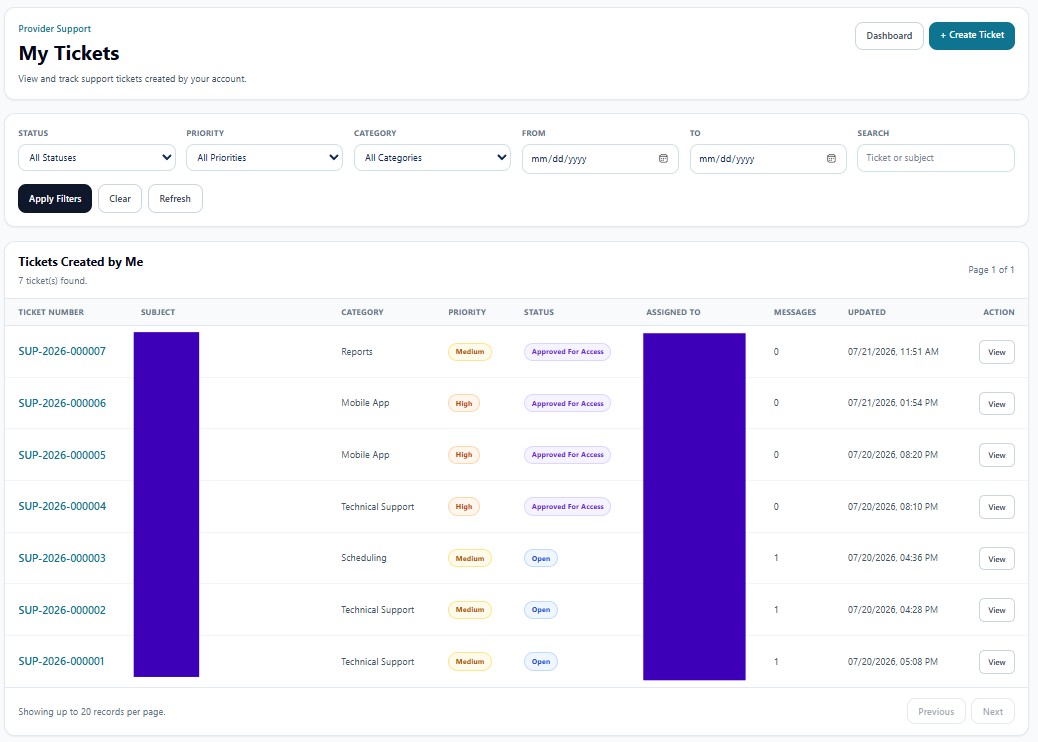
Header Actions
| Action | Function |
|---|---|
| Dashboard | Returns to the Support Dashboard. |
| + Create Ticket | Starts a new support request. |
Filters
| Filter | Function |
|---|---|
| Status | Filters Open, In Progress, Waiting for Provider, Approved for Access, Resolved, Closed, or another configured state. |
| Priority | Filters Low, Medium, High, or Urgent tickets. |
| Category | Limits results to the selected support category. |
| From / To | Selects the date range. |
| Search | Searches ticket number or subject. |
| Apply Filters | Runs the selected filter set. |
| Clear | Clears filter values. |
| Refresh | Reloads the current user's tickets. |
Tickets Created by Me
| Column | Function |
|---|---|
| Ticket Number | Unique system-generated support identifier. |
| Subject | Summary of the reported issue. |
| Category | Support classification. |
| Priority | Operational impact level. |
| Status | Current workflow state. |
| Assigned To | Platform Support owner or unassigned status. |
| Messages | Number of ticket-conversation messages. |
| Updated | Most recent ticket activity time. |
| View | Opens the ticket conversation, attachments, access status, and detailed history. |
Provider User Responsibilities
The requester should monitor Waiting for Provider tickets, respond within the ticket, confirm whether the issue is resolved, and revoke or allow temporary support access only as needed. Ticket messages should stay focused on the reported issue and avoid unrelated PHI.