
SCHEDULE MANAGEMENT
Master Events
Purpose
Define recurring service patterns that become the source for generated weekly shifts.
Provider Training Notice
This guide presents the general purpose and standard user flow of this feature. To protect the proprietary scheduling methodology and operational processes developed by True Care System, selected advanced procedures are intentionally not published in full. Official Provider customers receive direct onboarding and role-based training from the True Care System team after becoming active customers.
Add and Edit Master Events
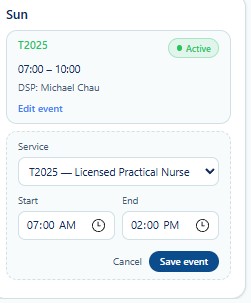
Create a recurring service event.
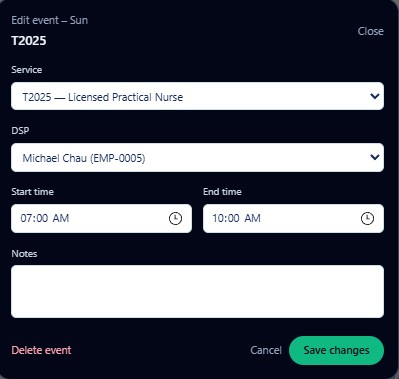
Update an existing recurring event.
Master Event Fields
- Service
- Select the approved recurring service.
- DSP
- Select the assigned employee when applicable.
- Start Time
- Defines when the event begins.
- End Time
- Defines when the event ends.
- Notes
- Stores necessary operational information.
Event Governance
Before Saving
- Verify service and DSP.
- Confirm day and time.
- Review authorization support.
- Review future weekly impact.
Before Deleting
- Review generated shifts.
- Confirm the event is no longer needed.
- Preserve historical records.
- Follow Provider approval procedures.
Training Scope
Direct Provider training covers template design, effective-date strategy, staffing continuity, deletion safeguards, and downstream schedule recovery.