
SCHEDULE MANAGEMENT
Weekly Shifts
Review generated or manually added service assignments for a specific date and week.
This guide presents the general purpose and standard user flow of this feature. To protect the proprietary scheduling methodology and operational processes developed by True Care System, selected advanced procedures are intentionally not published in full. Official Provider customers receive direct onboarding and role-based training from the True Care System team after becoming active customers.
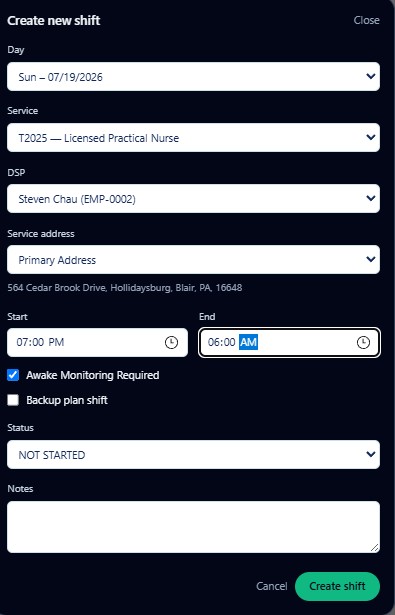
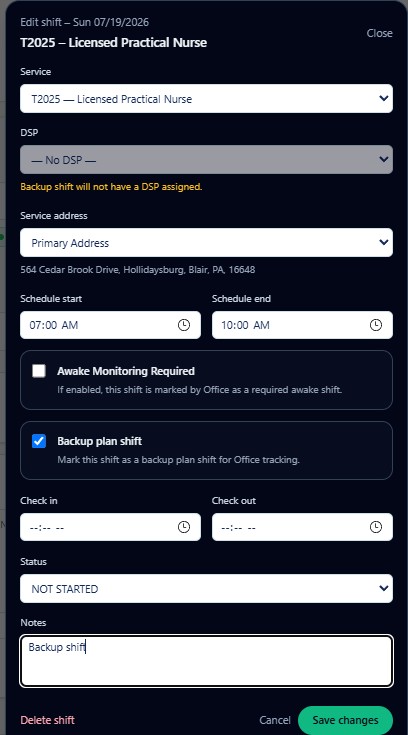
Create and Edit Weekly Shifts
Shift Review Checklist
Operational Indicators
| Indicator | General Meaning |
|---|---|
| Awake Monitoring Required | Identifies a shift requiring awake monitoring. |
| Backup Plan Shift | Identifies a shift tracked under the backup staffing plan. |
| Check In / Check Out | Displays actual service timing when available. |
| Status | Shows the current shift state. |
| Notes | Stores necessary operational context. |
Restricted Operational Detail
The public guide does not publish the complete decision tree for call-off response, emergency replacement, backup activation, awake-shift handling, failed check-in or check-out recovery, or escalation management.
Official Provider customers receive live operational training, role-specific examples, supervised practice, and implementation guidance from the True Care System team.
Training Scope
- Creating one-time shifts.
- Editing generated shifts safely.
- Call-off and staffing replacement.
- Backup-plan activation.
- Awake monitoring controls.
- Check-in and check-out exception handling.
- Schedule-to-visit reconciliation.