
INDIVIDUAL MANAGEMENT
Coverage & Billing
The Coverage & Billing tab captures insurance payer, eligibility, policy, authorization summary, billing address, guardian, and representative payee information. These details support payer verification, authorization review, claims preparation, billing readiness, financial reporting, and communication with responsible parties.
Screen Overview
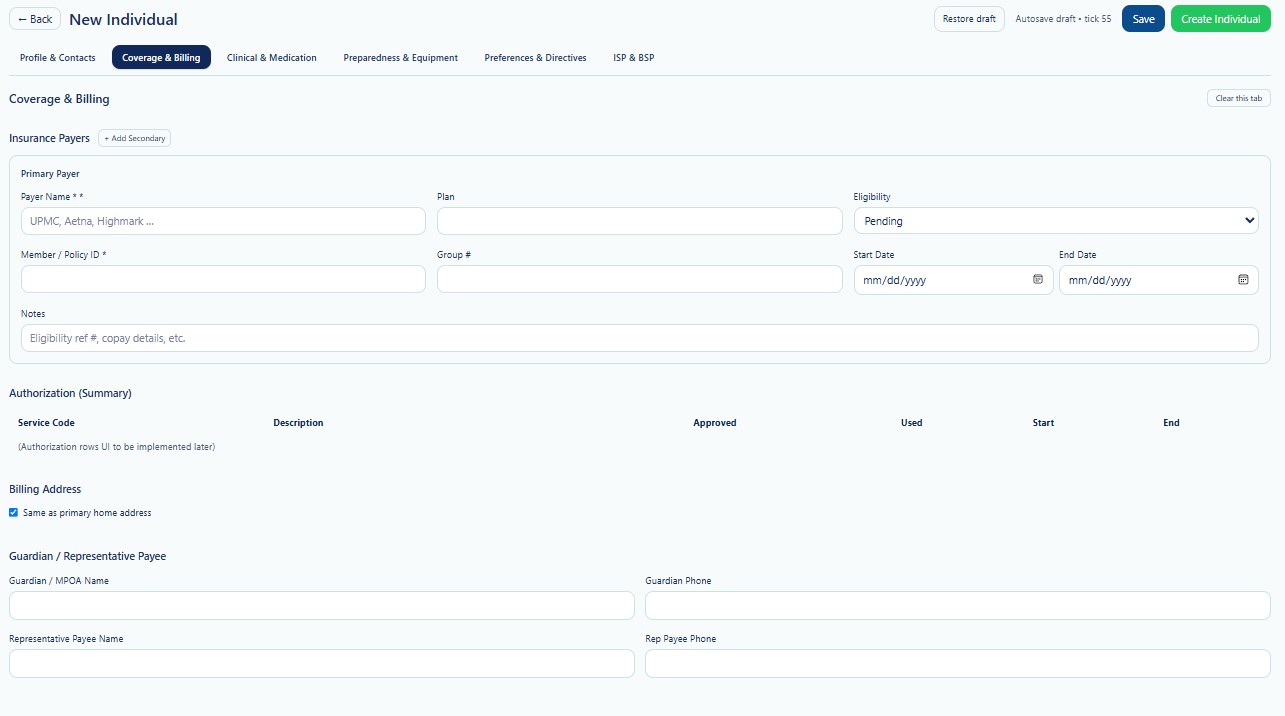
Coverage & Billing is the second tab in the New Individual workflow. Complete the available payer and billing information as accurately as possible. When required details are unavailable, save the record as a draft and return after verification.
Page Actions
| Action | Description | When to Use |
|---|---|---|
| Back | Returns to the previous Individual page. | Use when leaving the creation workflow. |
| Restore Draft | Restores previously saved draft information. | Use when continuing an incomplete record. |
| Save | Saves current progress without creating the final Individual. | Use when payer or billing information is incomplete. |
| Create Individual | Creates the Individual after required validation passes. | Use after required information has been reviewed. |
| Clear this tab | Clears values entered on the Coverage & Billing tab. | Use carefully when restarting this section. |
| + Add Secondary | Adds another insurance payer after the Primary Payer. | Use when the Individual has secondary coverage. |
Insurance Payers
The Insurance Payers section stores the Individual's Primary Payer and, when applicable, one or more Secondary Payers. Enter information from current payer cards, enrollment records, eligibility responses, or approved payer documentation.
| Field | Description | Requirement or Guidance |
|---|---|---|
| Payer Name | Name of the insurance payer or managed care organization. | Required for the Primary Payer. |
| Plan | Specific insurance plan, product, or program associated with the payer. | Enter when shown on the coverage record. |
| Eligibility | Current coverage status, such as Pending, Active, or another available status. | Update after eligibility verification. |
| Member / Policy ID | Member, subscriber, recipient, or policy identifier assigned by the payer. | Required when applicable to billing. |
| Group # | Employer, plan, or payer group number. | Optional unless required by the payer. |
| Start Date | Date coverage begins. | Use MM/DD/YYYY. |
| End Date | Date coverage ends, when known. | Leave blank when coverage is ongoing and the payer allows it. |
| Notes | Additional eligibility, copay, reference number, or payer-specific details. | Do not enter unnecessary sensitive information. |
Do not rely only on an insurance card. Verify current eligibility, coverage dates, member identifiers, payer requirements, and authorization status before billing.
Primary and Secondary Payers
Primary Payer
The Primary Payer is the payer expected to be billed first according to the Individual's current coverage and coordination-of-benefits rules.
Secondary Payer
Use + Add Secondary when another payer may be responsible after the Primary Payer. Secondary coverage should be entered in the correct billing order.
- Confirm which payer is primary before submitting claims.
- Do not assume Medicaid is always primary.
- Review Medicare, commercial insurance, managed care, waiver, and program rules.
- Update payer order when coverage changes.
- Retain effective dates for historical billing review.
Eligibility Status
Eligibility indicates whether coverage is currently verified or still awaiting review. The available system list may include statuses such as Pending or other Provider-defined values.
| Status | Description | Recommended Action |
|---|---|---|
| Pending | Eligibility has not yet been fully verified or supporting information is incomplete. | Complete verification before billing. |
| Active | Coverage has been verified for the applicable service period. | Continue to monitor effective dates and authorization limits. |
| Inactive / Ended | Coverage is no longer active for new dates of service. | Do not bill dates outside the valid coverage period. |
Authorization Summary
The Authorization Summary provides a high-level view of authorized services connected to the Individual. The screenshot indicates that authorization rows may be implemented or populated through the Authorization module.
| Column | Description | Use |
|---|---|---|
| Service Code | Authorized service identifier. | Matches the approved service. |
| Description | Service description. | Helps users confirm the correct service. |
| Approved | Total authorized units or amount. | Used to monitor the approved limit. |
| Used | Units or amount already consumed. | Supports utilization review. |
| Start | Authorization effective date. | Defines the first valid service date. |
| End | Authorization expiration date. | Defines the last valid service date. |
Insurance coverage does not replace service authorization. Services must meet both payer eligibility and authorization requirements before billing.
Billing Address
Select Same as primary home address when the Individual's billing address matches the Primary Address entered on the Profile & Contacts tab.
- Keep the option selected when both addresses are the same.
- Clear the option when claims, statements, or correspondence require another address.
- Verify address changes before billing or mailing financial documents.
- Do not use an emergency contact address unless it is also the approved billing address.
Guardian / Representative Payee
This section records the person legally or financially responsible for receiving information, assisting with decisions, or managing benefits on behalf of the Individual.
| Field | Description | Guidance |
|---|---|---|
| Guardian / MPOA Name | Name of the legal guardian or medical power of attorney. | Verify the applicable legal documentation. |
| Guardian Phone | Primary phone number for the guardian or MPOA. | Keep current for consent and communication needs. |
| Representative Payee Name | Name of the person or entity managing benefits or payments. | Enter only when formally designated. |
| Rep Payee Phone | Primary phone number for the representative payee. | Verify before financial communication. |
A contact name alone does not establish legal authority. Confirm guardianship, medical power of attorney, representative payee status, and disclosure permissions using approved documentation and Provider policy.
Validation Checklist
- Primary Payer is selected when coverage applies.
- Member or Policy ID matches the payer record.
- Eligibility status reflects the latest verification.
- Coverage Start and End Dates are accurate.
- Secondary Payers are entered in the correct billing order.
- Authorization requirements are reviewed separately.
- Billing Address is correct.
- Guardian and Representative Payee authority is verified.
- Phone numbers use valid formats.
- Notes include only necessary billing or eligibility information.
Best Practices
- Verify eligibility before the first service date and before billing.
- Recheck eligibility when coverage, payer, or plan information changes.
- Use effective dates instead of overwriting historical coverage meaning.
- Review coordination of benefits before selecting the Primary Payer.
- Confirm Member or Policy IDs directly from approved payer records.
- Do not bill services outside coverage or authorization dates.
- Document eligibility reference numbers or important payer notes when required.
- Keep guardian and representative payee information current.
Security and HIPAA
Coverage & Billing contains protected health information, payer identifiers, financial information, eligibility details, guardian information, and representative payee information.
- Access only records required for assigned job duties.
- Apply role-based access and the minimum necessary principle.
- Do not share insurance cards or payer identifiers through unapproved channels.
- Verify identity and authority before discussing coverage or billing with another person.
- Do not include unnecessary medical or financial details in Notes.
- Record access and changes through Audit Logs where applicable.
- Use approved secure methods when sending payer or eligibility information.
Troubleshooting
The payer is not available in the Payer Name list.
Confirm that the payer is configured and Active for the current Provider. Contact an authorized administrator when payer setup is missing.
The Member or Policy ID is rejected.
Verify the identifier format, remove accidental spaces, and compare it with the current payer card or eligibility response.
Eligibility remains Pending.
Complete the required eligibility verification process and update the status after receiving a valid payer response.
Authorization Summary is empty.
Confirm that an authorization has been created and linked to the Individual in the Authorization module. The summary may remain empty until authorization data is available.
The Billing Address is incorrect.
Review the Primary Address on Profile & Contacts. Clear the same-address option when a different billing address is required.
Secondary coverage is missing.
Select + Add Secondary and enter the additional payer in the correct coordination-of-benefits order.
Frequently Asked Questions
Can I create the Individual while eligibility is Pending?
The system may allow the record to be created, but services should not be billed until eligibility and authorization requirements are verified.
Is the Payer Name the same as the Plan?
No. The Payer Name identifies the insurance company or managed care organization. The Plan identifies the specific product, benefit, or program.
Can an Individual have more than one payer?
Yes. Use Primary and Secondary Payer entries according to coordination-of-benefits rules.
Does active insurance mean the service is authorized?
No. Eligibility confirms coverage status. Authorization confirms that a specific service, amount, and date range are approved.
Can payer information be edited later?
Yes. Authorized users may update payer information after locating the Individual through Search Individual. Preserve historical accuracy when coverage changes.
Who should be entered as Representative Payee?
Enter only the person or organization formally designated to manage benefits or payments for the Individual.