
INDIVIDUAL MANAGEMENT
New Individual
The New Individual page is the starting point for creating a new Individual record. Users complete six setup tabs, save or restore draft information, and create the Individual after all required information has been reviewed.
Screen Overview
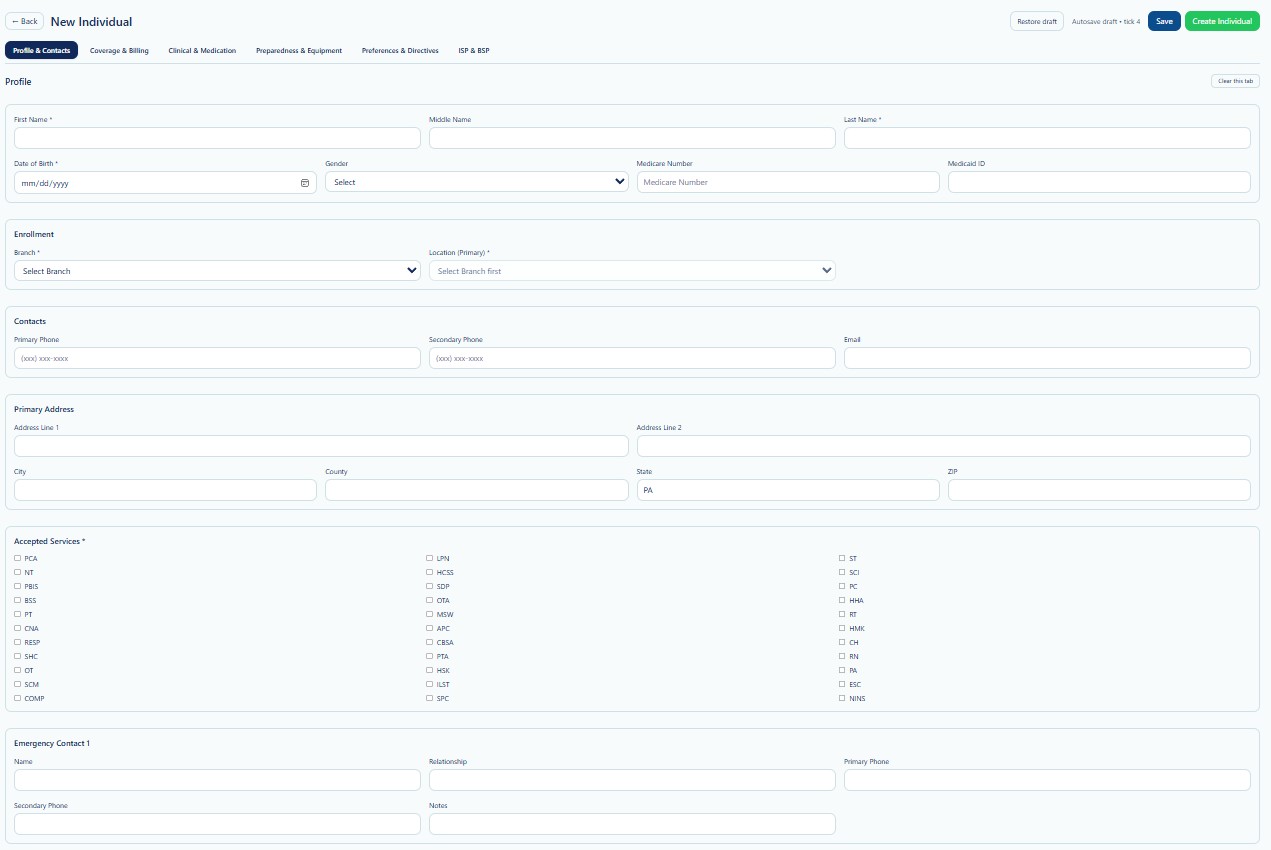
The six tabs organize the Individual intake process into profile, payer, clinical, preparedness, preference, and support-plan information. Users may move between tabs while entering data.
Page Actions
| Action | Description | When to Use |
|---|---|---|
| Back | Returns to the previous Individual page. | Use when leaving the workflow. |
| Restore Draft | Restores previously saved draft information. | Use when continuing an incomplete Individual. |
| Save | Saves the current intake information without creating the final Individual. | Use when required information is incomplete. |
| Create Individual | Creates the Individual after required validation passes. | Use after all required information has been reviewed. |
| Clear this tab | Clears information from the currently selected tab. | Use carefully when restarting a tab. |
New Individual Tabs
| Tab | What Users Enter or Review | Documentation |
|---|---|---|
| 1. Profile & Contacts | Name, date of birth, gender, Medicare and Medicaid identifiers, branch, primary location, phone numbers, email, address, accepted services, and emergency contact information. | Open guide |
| 2. Coverage & Billing | Primary and secondary insurance, eligibility status, member or policy ID, group number, coverage dates, billing address, and guardian or representative payee. | Open guide |
| 3. Clinical & Medication | Primary care physician, medications, allergies, reactions, and diagnosis information. | Open guide |
| 4. Preparedness & Equipment | Priority code, mobility status, medical equipment, mobility devices, and other dependencies needed for emergency or continuity planning. | Open guide |
| 5. Preferences & Directives | Scheduling preferences, preferred days and time window, languages, caregiver gender preference, advanced directives, status, physician, and attachments or notes. | Open guide |
| 6. ISP & BSP | ISP plan status, service coordinator, outcomes, authorized services, health and safety information, BSP behaviors, triggers, prevention strategies, interventions, data collection, responsible team, and attachments. | Open guide |
The ISP & BSP section may require the Individual record to be created first. When prompted, create the Individual, reopen the record through Search Individual, and then complete ISP & BSP.
Recommended Workflow
- Search existing Individuals before creating a new record.
- Open New Individual.
- Complete Profile & Contacts.
- Complete Coverage & Billing.
- Complete Clinical & Medication.
- Complete Preparedness & Equipment.
- Complete Preferences & Directives.
- Save the draft when information is incomplete.
- Review required information.
- Select Create Individual.
- Reopen the Individual and complete ISP & BSP when required.
Draft Behavior
The page displays an autosave draft indicator. Save and Restore Draft provide additional control when the intake cannot be completed in one session.
- Use Save before leaving an incomplete intake.
- Use Restore Draft when returning to unfinished information.
- Do not rely on placeholders for missing required information.
- Review restored values before creating the Individual.
Validation Checklist
- The Individual does not already exist.
- Legal name and date of birth are accurate.
- Branch and Primary Location are selected.
- Medicaid and Medicare identifiers are verified when applicable.
- Coverage and eligibility information are current.
- Clinical and medication information comes from approved records.
- Preparedness and equipment dependencies are current.
- Preferences and directives are documented accurately.
- Required fields on all tabs are complete.
- The record is reviewed before Create Individual is selected.
Best Practices
- Search before creating an Individual to prevent duplicates.
- Use legal and payer records as the source of truth.
- Save incomplete information as a draft.
- Do not enter placeholder Medicaid IDs, phone numbers, or diagnoses.
- Keep information limited to what is necessary for operations and care.
- Review each tab before final creation.
- Complete ISP & BSP after creation when the system requires it.
Security and HIPAA
The New Individual workflow may contain protected health information, personally identifiable information, payer data, clinical details, diagnoses, medication information, safety needs, preferences, directives, and support plans.
- Access only records required for assigned job duties.
- Apply role-based access and the minimum necessary principle.
- Do not create test records using real Individual information.
- Do not share screenshots through unapproved channels.
- Verify the Provider context before entering information.
- Access and changes should be recorded through Audit Logs where applicable.
Troubleshooting
Create Individual does not complete.
Review required fields and validation messages across all tabs.
Saved draft information does not appear.
Select Restore Draft and confirm that the correct user, browser, and session are being used.
A required service or payer is missing.
Confirm that the item is configured and Active for the current Provider.
ISP & BSP cannot be saved.
Create the Individual first, reopen the record through Search Individual, and return to ISP & BSP.
A possible duplicate Individual is found.
Do not create another record. Contact an authorized administrator or support user.
Frequently Asked Questions
Can I save before completing all six tabs?
Yes. Use Save to preserve the draft and continue later.
Can I move between tabs before creating the Individual?
Yes. Review and complete the tabs in the order appropriate to the intake.
Does Save create the Individual?
No. Save preserves the draft. Create Individual creates the final record.
Why must ISP & BSP sometimes be completed later?
The ISP and BSP may require an existing Individual ID before the information can be linked and saved.
Can the information be edited after creation?
Yes. Search for the Individual and use View / Edit or Individual Detail.