
INDIVIDUAL MANAGEMENT
Profile & Contacts
The Profile & Contacts tab captures the Individual's core identity, enrollment, contact, address, accepted service, and emergency contact information. This information supports authorizations, scheduling, EVV, visits, billing, reporting, communication, and emergency response workflows throughout True Care System.
Screen Overview
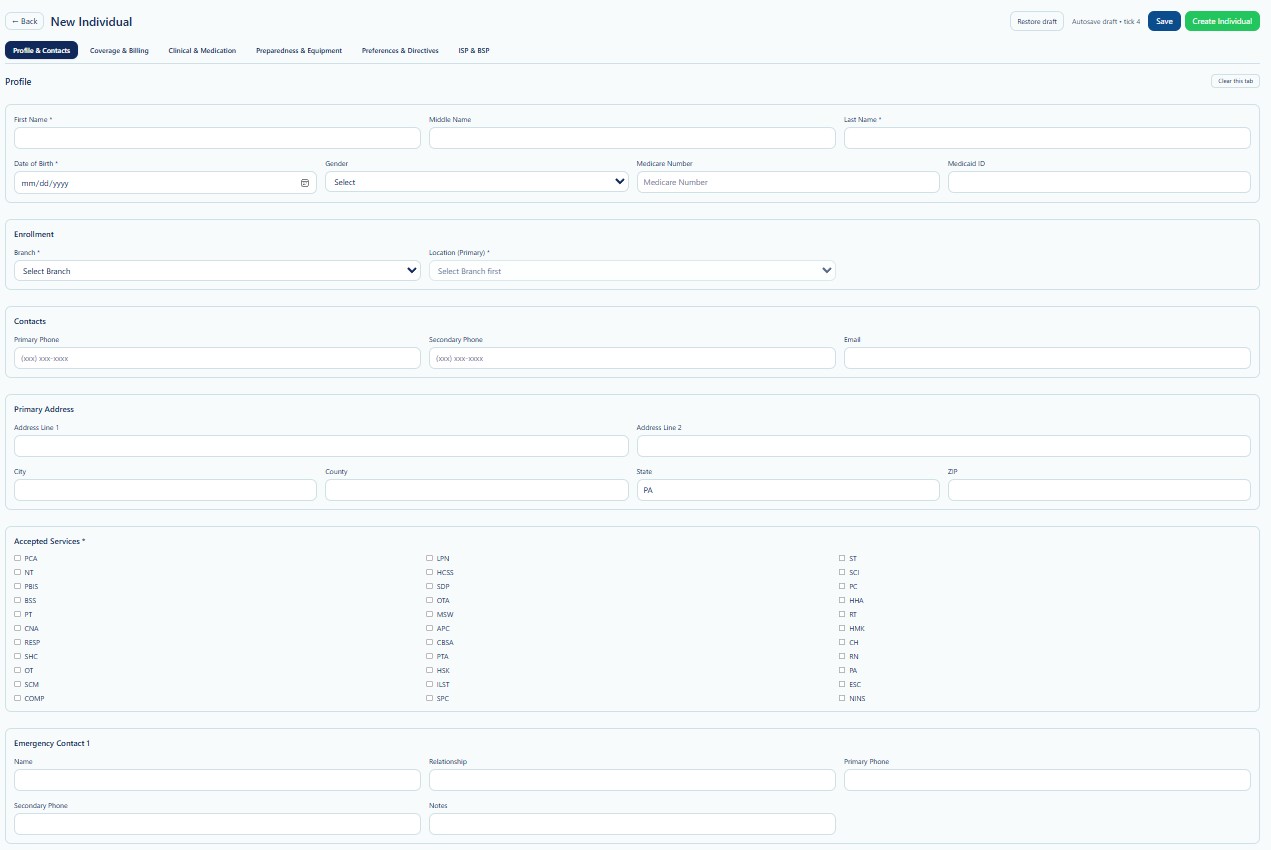
Profile & Contacts is the first tab in the New Individual workflow. Complete the required fields before creating the Individual. You may save progress as a draft and return later when additional information is needed.
Page Actions
| Action | Description | When to Use |
|---|---|---|
| Back | Returns to the previous Individual page. | Use when leaving the creation workflow. |
| Restore Draft | Restores information saved during an earlier draft session. | Use when continuing an incomplete Individual record. |
| Save | Saves the current draft without creating the final Individual record. | Use when required information is not yet complete. |
| Create Individual | Creates the Individual after required validation passes. | Use after reviewing all required tabs and fields. |
| Clear this tab | Clears values entered on the current tab. | Use carefully when restarting the tab. |
Profile
| Field | Description | Requirement |
|---|---|---|
| First Name | Individual's legal first name. | Required |
| Middle Name | Individual's legal middle name, when applicable. | Optional |
| Last Name | Individual's legal last name. | Required |
| Date of Birth | Individual's date of birth in MM/DD/YYYY format. | Required |
| Gender | Gender value selected from the available system list. | Required |
| Medicare Number | Medicare identifier when the Individual has Medicare coverage. | Optional |
| Medicaid ID | Medicaid identifier used for payer, authorization, EVV, and billing workflows. | Required when applicable |
Verify the legal name, date of birth, and Medicaid ID against approved enrollment or payer records before creating the Individual.
Enrollment
| Field | Description | Requirement |
|---|---|---|
| Branch | Provider branch responsible for the Individual. | Required |
| Location (Primary) | Primary operational location associated with the selected branch. | Required |
Select the Branch first. The Primary Location list may depend on the selected Branch.
Contacts
| Field | Description | Guidance |
|---|---|---|
| Primary Phone | Main phone number for contacting the Individual. | Use the most reliable current number. |
| Secondary Phone | Alternative phone number. | Optional. |
| Individual's email address when available. | Enter a valid email format. |
Primary Address
| Field | Description | Guidance |
|---|---|---|
| Address Line 1 | Primary street address. | Enter the complete street number and street name. |
| Address Line 2 | Apartment, suite, unit, or secondary address detail. | Optional. |
| City | City of residence. | Use the official mailing city. |
| County | County of residence. | Important for service area and reporting. |
| State | State abbreviation. | Defaults to PA when configured by the Provider. |
| ZIP | Postal ZIP code. | Verify the ZIP matches the address. |
Accepted Services
Accepted Services identifies the types of services the Individual may receive from the Provider. The available list is based on the Provider's configured services.
Examples shown on the screen may include PCA, NT, PBIS, BSS, PT, CNA, RESP, SHC, OT, SCM, COMP, LPN, HCSS, SDP, OTA, MSW, APC, CBSA, PTA, HSL, ILST, SPC, ST, SCI, PC, HHA, RT, HMK, CH, RN, PA, ESC, and NINS.
Select only services that the Provider is authorized to deliver and that may apply to the Individual. Final authorization, payer approval, and scheduling rules are managed in their respective modules.
Emergency Contact 1
| Field | Description | Guidance |
|---|---|---|
| Name | Emergency contact's full name. | Use the current legal or preferred contact name. |
| Relationship | Relationship to the Individual. | Examples: parent, sibling, guardian, spouse, representative. |
| Primary Phone | Main emergency contact number. | Verify the number is current. |
| Secondary Phone | Alternative contact number. | Optional. |
| Notes | Additional emergency contact instructions. | Do not enter unnecessary sensitive information. |
Validation Checklist
- First Name and Last Name match the legal or payer record.
- Date of Birth is complete and accurate.
- Gender is selected.
- Branch and Primary Location are selected.
- Medicaid ID is verified when Medicaid services apply.
- Phone numbers and email use valid formats.
- Address information is complete enough for service delivery and reporting.
- Accepted Services reflect the Individual's expected service relationship.
- Emergency contact information is current.
Best Practices
- Use the Individual's legal name as shown on official records.
- Do not create duplicate Individual records.
- Search existing Individuals before creating a new record.
- Verify Medicaid and Medicare identifiers before saving.
- Keep phone, address, and emergency contact information current.
- Use Save when information is incomplete instead of entering placeholder data.
- Review the record before selecting Create Individual.
Security and HIPAA
Profile & Contacts contains protected health information and personally identifiable information, including name, date of birth, address, phone number, email, Medicare number, Medicaid ID, service information, and emergency contacts.
- Access only Individuals required for assigned job duties.
- Follow role-based access and the minimum necessary principle.
- Do not share Individual information through unapproved channels.
- Verify the correct Individual before viewing or editing information.
- Changes and access should be recorded through Audit Logs where applicable.
- Do not use real Individual information in training screenshots unless properly authorized and protected.
Troubleshooting
Create Individual does not complete.
Review required fields, validation messages, and all six setup tabs. Confirm that mandatory profile and enrollment values are complete.
The Primary Location list is empty.
Select a Branch first. If no locations appear, confirm that the Provider has active locations configured for that Branch.
The Medicaid ID is rejected or already exists.
Verify the identifier and search for an existing Individual before creating a duplicate.
A service is missing from Accepted Services.
Confirm that the service is configured and Active in Service Management for the current Provider.
Draft information is missing.
Select Restore Draft and confirm that the draft was saved in the same browser and user session supported by the system.
Frequently Asked Questions
Can I save the Individual before all information is complete?
Yes. Use Save to preserve the current draft and continue later.
Can I edit Profile & Contacts after creating the Individual?
Yes. Locate the Individual through Search Individual, open View/Edit, and update the appropriate Individual Detail area.
Is Medicaid ID always required?
It is required when applicable to Medicaid enrollment, authorization, EVV, or billing. Provider and payer requirements determine when it must be completed.
Can I change the Branch later?
Authorized users may update the Branch, but they should review related locations, schedules, authorizations, visits, and operational assignments before changing it.
What should I do if I find a duplicate Individual?
Do not create another record. Contact an authorized administrator or support user to review the duplicate and determine the approved correction process.