
INDIVIDUAL MANAGEMENT
ISP & BSP
The ISP & BSP tab captures the Individual Support Plan, service outcomes, authorized service units, health and safety information, behaviors of concern, triggers, prevention strategies, intervention procedures, data collection, responsible team members, and supporting attachments.
Screen Overview
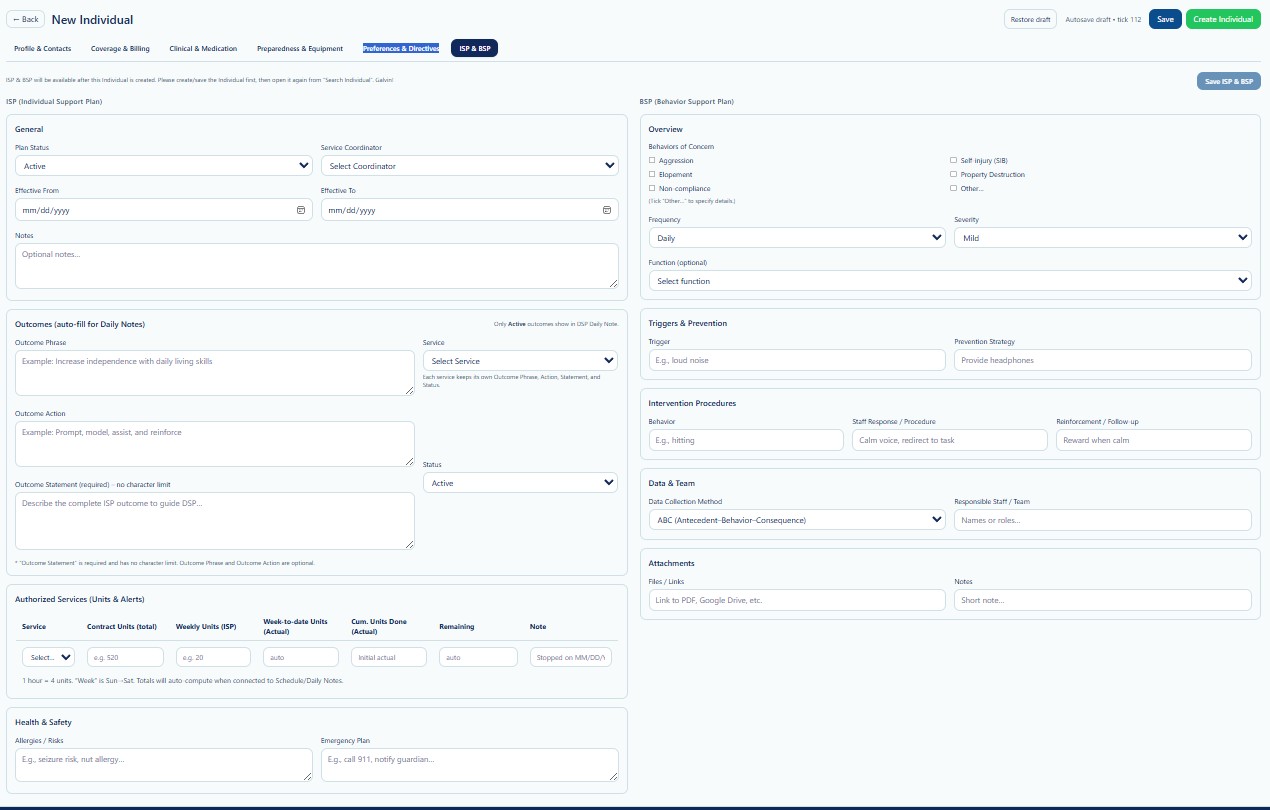
ISP & BSP is the sixth tab in the New Individual workflow. The screen is divided into two primary work areas: the Individual Support Plan on the left and the Behavior Support Plan on the right.
The system may require the Individual to be created before ISP & BSP information can be saved. When prompted, create or save the Individual, reopen the record through Search Individual, and then complete this section.
Page Actions
| Action | Description | When to Use |
|---|---|---|
| Back | Returns to the previous Individual page. | Use when leaving the creation workflow. |
| Restore Draft | Restores previously saved draft information. | Use when continuing an incomplete record. |
| Save | Saves current New Individual progress. | Use before the Individual record is finalized. |
| Create Individual | Creates the Individual after required validation passes. | Use when all required intake information is complete. |
| Save ISP & BSP | Saves the ISP and BSP information associated with the created Individual. | Use after the Individual record exists. |
ISP — General
| Field | Description | Guidance |
|---|---|---|
| Plan Status | Current status of the ISP. | Select the value that reflects the approved plan status. |
| Service Coordinator | Coordinator responsible for the Individual's plan. | Select the current assigned coordinator. |
| Effective From | Date the ISP becomes effective. | Use MM/DD/YYYY. |
| Effective To | Date the ISP expires or ends. | Use MM/DD/YYYY when applicable. |
| Notes | Short plan notes or operational context. | Keep notes necessary, current, and person-centered. |
ISP — Outcomes
Outcomes define what the Individual is working toward and how staff should support progress. The screen indicates that Active outcomes may auto-fill into DSP Daily Notes.
| Field | Description | Guidance |
|---|---|---|
| Outcome Phrase | Short statement describing the desired result. | Example: Increase independence with daily living skills. |
| Service | Service connected to the outcome. | Select the correct active service. |
| Outcome Action | Action staff should take to support the outcome. | Use clear and measurable instructions. |
| Status | Current status of the outcome. | Only Active outcomes should flow into daily documentation. |
| Outcome Statement | Complete statement that guides DSP documentation and support. | Required on the screen and has no character limit. |
Each selected service supports one Outcome Phrase, Action, Statement, and Status. Keep all four elements aligned with the approved ISP.
Authorized Services — Units & Alerts
This section records service unit limits and utilization information associated with the ISP.
| Column | Description | Guidance |
|---|---|---|
| Service | Authorized service. | Select the approved service. |
| Contract Units (total) | Total units approved for the authorization or plan period. | Enter the approved total. |
| Weekly Units (ISP) | Expected units per week. | Use the approved weekly amount. |
| Week-to-date Units (Actual) | Actual units used during the current week. | May calculate automatically when connected to scheduling and notes. |
| Cumulative Units Done (Actual) | Total actual units delivered. | Review for utilization tracking. |
| Remaining | Units still available. | Monitor to prevent overuse. |
| Note | Operational note or alert. | Use for stop dates or important unit instructions. |
The screen notes that one hour equals four units and that the week runs Sunday through Saturday. Totals may auto-compute when connected to Schedule and Daily Notes.
Health & Safety
| Field | Description | Guidance |
|---|---|---|
| Allergies / Risks | Important allergy, seizure, fall, or other safety risk information. | Enter concise, verified safety information. |
| Emergency Plan | Short emergency response instructions. | Example: Call 911 and notify guardian. |
These fields do not replace complete clinical, emergency, nursing, or risk management plans.
BSP — Overview
The Behavior Support Plan documents behaviors of concern and the context needed for prevention, intervention, monitoring, and staff response.
Behaviors of Concern
- Aggression
- Elopement
- Non-compliance
- Self-Injury (SIB)
- Property Destruction
- Other
Use Other only when the behavior is not represented by the available choices, and describe the behavior objectively in the supporting details.
BSP — Frequency, Severity, and Function
| Field | Description | Guidance |
|---|---|---|
| Frequency | How often the behavior generally occurs. | Select the current approved frequency. |
| Severity | Relative intensity or risk level. | Select the current approved severity. |
| Function | Likely purpose or maintaining factor of the behavior. | Select only when supported by the behavior assessment or plan. |
Staff should not guess the function of a behavior. Use the value supported by the approved assessment or Behavior Support Plan.
Triggers & Prevention
| Field | Description | Guidance |
|---|---|---|
| Trigger | Event, condition, request, environment, or situation associated with the behavior. | Use objective language such as “loud noise.” |
| Prevention Strategy | Action staff should take to reduce the likelihood of the behavior. | Example: Provide headphones. |
Intervention Procedures
| Field | Description | Guidance |
|---|---|---|
| Behavior | Specific behavior requiring a response. | Describe it objectively and clearly. |
| Staff Response / Procedure | Approved staff action during or after the behavior. | Example: Calm voice and redirect to task. |
| Reinforcement / Follow-up | Approved reinforcement or follow-up action. | Example: Reward when calm. |
Staff procedures must match the approved BSP, training, and Provider policy. Do not create restrictive, punitive, or unapproved procedures in this field.
Data & Team
| Field | Description | Guidance |
|---|---|---|
| Data Collection Method | Method used to collect behavior data. | The screen shows ABC (Antecedent–Behavior–Consequence). |
| Responsible Staff / Team | Staff names, roles, or team responsible for implementation and review. | Enter current approved roles or team members. |
Attachments
| Field | Description | Guidance |
|---|---|---|
| Files / Links | Reference to the ISP, BSP, PDF, Google Drive file, or other approved document. | Use only approved secure storage. |
| Notes | Short note about the attachment or plan. | Do not paste the full plan into the field. |
Validation Checklist
- The Individual record has been created before saving ISP & BSP.
- Plan Status and effective dates match the approved ISP.
- The correct Service Coordinator is selected.
- Each outcome is person-centered, measurable, and linked to the correct service.
- Outcome Status is accurate.
- Authorized units match the approved authorization or plan.
- Health and safety information is current.
- Behaviors of concern match the approved BSP.
- Frequency, severity, and function are supported by documentation.
- Triggers and prevention strategies are clear.
- Intervention procedures match approved training and policy.
- Data collection method and responsible team are identified.
- Attachments use secure, approved storage.
Best Practices
- Use the current approved ISP and BSP as the source of truth.
- Write outcomes in clear, person-centered language.
- Keep actions specific enough for DSP staff to follow.
- Review units regularly to prevent underuse or overuse.
- Update plans after formal revisions or team review.
- Do not document assumptions about behavior function.
- Use objective descriptions instead of labels or judgmental wording.
- Coordinate updates with the Service Coordinator, clinical team, behavior specialist, and authorized staff.
- Archive replaced plans according to retention policy.
Security and HIPAA
ISP & BSP contains highly sensitive protected health information, behavioral information, safety risks, service plans, utilization data, and legal or clinical documentation.
- Access only Individuals required for assigned job duties.
- Apply role-based access and the minimum necessary principle.
- Do not share plans through unapproved channels.
- Use secure storage for attachments and links.
- Verify the correct Individual before viewing or editing the plan.
- Record access and changes through Audit Logs where applicable.
- Do not include unnecessary details in Notes fields.
Troubleshooting
Save ISP & BSP is unavailable.
Create the Individual first, reopen the record through Search Individual, and then return to ISP & BSP.
The Service list is empty.
Confirm that the Provider has Active services configured and that the Individual is eligible for the selected service.
Actual units are not calculating.
Confirm that Schedule and Daily Notes are connected to the same service and date range.
An outcome does not appear in Daily Notes.
Confirm that the outcome Status is Active and that it is linked to the correct service.
The behavior function is unknown.
Leave it unselected until supported by the approved assessment or plan.
An attachment link does not open.
Verify the file location, permissions, secure link, and document availability.
Frequently Asked Questions
Can ISP & BSP be completed before the Individual is created?
The screen indicates that the Individual may need to be created first. Save the intake, create the Individual, and then reopen the record.
Can one service have more than one outcome?
The screen notes that each selected service keeps its own Outcome Phrase, Action, Statement, and Status. Add or manage outcomes according to the approved workflow.
Does this page replace the official ISP or BSP document?
No. It captures operational data and references. The approved signed plan remains the source document.
Who may edit behavior procedures?
Only authorized users should edit them, based on the approved BSP and Provider policy.
Should inactive outcomes be deleted?
Normally, no. Change the status and preserve history according to Provider policy.
Can external document links be used?
Yes, when they use approved secure storage and access is restricted to authorized users.