
INDIVIDUAL MANAGEMENT
Preparedness & Equipment
The Preparedness & Equipment tab records the Individual's priority level, mobility status, medical equipment, assistive devices, and other dependencies. This information supports emergency preparedness, continuity of care, evacuation planning, caregiver matching, scheduling, service delivery, and safety planning.
Screen Overview
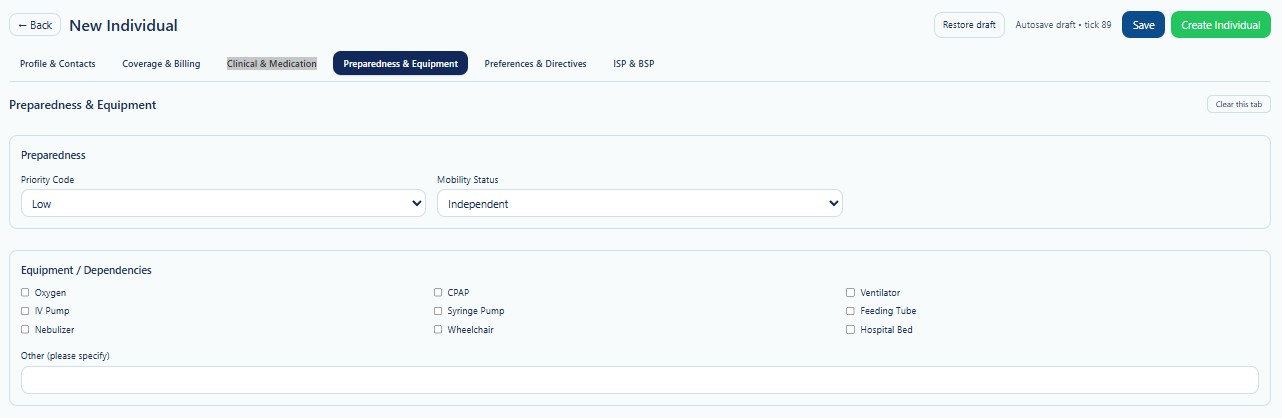
Preparedness & Equipment is the fourth tab in the New Individual workflow. Complete this tab using current information from the Individual, guardian, clinical records, service plan, nursing documentation, or other approved sources.
Page Actions
| Action | Description | When to Use |
|---|---|---|
| Back | Returns to the previous Individual page. | Use when leaving the creation workflow. |
| Restore Draft | Restores previously saved draft information. | Use when continuing an incomplete record. |
| Save | Saves current progress without creating the final Individual. | Use when preparedness information is incomplete. |
| Create Individual | Creates the Individual after required validation passes. | Use after all required tabs have been reviewed. |
| Clear this tab | Clears values entered on the current tab. | Use carefully when restarting this section. |
Preparedness
The Preparedness section identifies the Individual's current priority level and mobility status. These values help staff understand the level of assistance that may be required during routine services or emergency situations.
| Field | Description | Guidance |
|---|---|---|
| Priority Code | Indicates the relative level of urgency or assistance needed during an emergency or service disruption. | Select the value approved by Provider policy or the Individual's preparedness plan. |
| Mobility Status | Describes how independently the Individual can move, transfer, or evacuate. | Select the status that reflects current functional ability. |
Priority Code
The screenshot shows a Priority Code selection with Low selected. Additional values may be available according to the Provider's configuration.
| Example Priority | General Meaning | Operational Consideration |
|---|---|---|
| Low | The Individual is generally stable and may require limited assistance during an emergency. | Continue routine preparedness planning and keep contact information current. |
| Medium | The Individual may require additional support, supervision, or coordination. | Confirm transportation, staffing, and backup support. |
| High | The Individual may depend on equipment, staff, medication, or frequent support. | Maintain a detailed continuity and emergency response plan. |
| Critical | The Individual may face immediate health or safety risk if services, equipment, or power are interrupted. | Use the highest level of emergency planning, backup resources, and escalation. |
The exact meaning of each Priority Code must follow the Provider's approved emergency preparedness policy. Do not assign a higher or lower priority without supporting information.
Mobility Status
Mobility Status identifies how the Individual moves and the type of assistance that may be required. The screenshot shows Independent as the selected value.
| Example Status | Description | Planning Consideration |
|---|---|---|
| Independent | The Individual can generally move and transfer without physical assistance. | Confirm whether verbal prompts or supervision are still required. |
| Cane / Walker | The Individual uses a mobility aid for walking. | Ensure the aid is available during transport and evacuation. |
| Wheelchair | The Individual uses a manual or powered wheelchair. | Plan for accessible transportation, ramps, transfers, and charging when applicable. |
| Bed Bound | The Individual cannot independently leave the bed or transfer. | Require specialized evacuation and transport planning. |
| Other | The Individual has another mobility condition not represented by the available choices. | Describe the condition clearly in approved notes or related plans. |
Equipment / Dependencies
Select every device or dependency currently used by the Individual. These selections help staff identify safety needs, required caregiver competencies, transport needs, backup planning, and potential risks during emergencies or power interruptions.
| Equipment | Purpose | Planning Consideration |
|---|---|---|
| Oxygen | Provides supplemental oxygen. | Confirm flow requirements, tank supply, backup source, storage, and fire safety. |
| IV Pump | Controls intravenous fluid or medication delivery. | Confirm trained staff, power needs, battery backup, and emergency instructions. |
| Nebulizer | Delivers respiratory medication as a mist. | Confirm medication availability, electrical needs, cleaning, and backup access. |
| CPAP | Provides positive airway pressure during sleep. | Plan for electricity, battery backup, supplies, and alternate arrangements during outages. |
| Syringe Pump | Delivers controlled medication or fluid through a syringe. | Confirm trained support, battery status, supplies, and escalation instructions. |
| Wheelchair | Supports mobility and positioning. | Document type, transport requirements, charging needs, and transfer assistance. |
| Ventilator | Supports or controls breathing. | Requires critical backup power, backup equipment, trained staff, and emergency escalation. |
| Feeding Tube | Provides nutrition, hydration, or medication through a tube. | Confirm feeding schedule, supplies, positioning, trained staff, and emergency instructions. |
| Hospital Bed | Provides positioning, safety, or care support. | Confirm electrical needs, manual controls, transfer space, and emergency access. |
Other Equipment or Dependencies
Use the Other (please specify) field when the Individual uses equipment or has a dependency not represented by the available checkboxes.
Recommended Details
- Name and type of equipment.
- Whether it is used continuously, routinely, or only as needed.
- Power, battery, charging, oxygen, or supply requirements.
- Transfer, positioning, monitoring, or caregiver assistance needs.
- Backup equipment or alternate procedure.
- Important storage, transport, or safety instructions.
“Power wheelchair used daily; charger kept in bedroom; requires accessible van; manual backup chair available in front closet.”
Operational Impact
| Workflow | How the Information May Be Used | Review Needed |
|---|---|---|
| Scheduling | Helps identify staffing, travel time, visit duration, accessibility, and equipment considerations. | Confirm the assigned DSP can safely support the Individual. |
| Caregiver Matching | Supports matching with employees who have the required skills, training, or physical capability. | Review competency requirements before assignment. |
| Visit Documentation | Provides context for equipment checks, assistance, safety observations, and service notes. | Document only information relevant to the visit. |
| Transportation | Identifies accessible vehicle, securement, oxygen, wheelchair, or equipment transport needs. | Confirm vehicle and driver readiness. |
| Emergency Response | Supports prioritization, evacuation, backup equipment, and continuity planning. | Keep emergency plans current and accessible to authorized staff. |
Emergency Preparedness and Continuity
Preparedness information should support the Provider's emergency plan for weather events, fires, utility failures, transportation disruptions, staffing shortages, and other incidents.
- Identify whether the Individual depends on electricity or battery-powered equipment.
- Confirm backup batteries, generators, tanks, supplies, or alternate devices.
- Document accessible transportation and evacuation requirements.
- Identify trained backup staff or responsible contacts.
- Maintain emergency medication, nutrition, and equipment supplies when required.
- Confirm where equipment manuals and emergency instructions are stored.
- Review plans after a major health, mobility, equipment, or location change.
Ventilators, oxygen systems, feeding equipment, pumps, and other critical dependencies require detailed contingency planning. The checkbox alone is not a complete emergency plan.
Validation Checklist
- Priority Code reflects the current approved preparedness level.
- Mobility Status reflects the Individual's current functional ability.
- Every active device or dependency is selected.
- Oxygen, ventilator, pump, and power dependencies are accurately identified.
- Other equipment is clearly described.
- Backup equipment or alternate procedures are known when required.
- Transportation and evacuation requirements are reviewed.
- Staff competency needs are identified.
- Information matches current clinical and service planning documentation.
Best Practices
- Review preparedness information during intake and at regular intervals.
- Update the record immediately after a mobility or equipment change.
- Do not select equipment that is no longer in use.
- Confirm equipment needs directly with approved clinical or planning records.
- Keep descriptions specific and operationally useful.
- Coordinate updates with nursing, clinical, scheduling, and emergency planning staff.
- Confirm backup power and supplies for critical equipment.
- Use this tab together with ISP, BSP, health and safety, and emergency plan documentation.
- Review caregiver competency before assigning staff to equipment-dependent Individuals.
Security and HIPAA
Preparedness & Equipment contains protected health information related to mobility, medical devices, respiratory support, nutrition, and emergency needs.
- Access only Individuals required for assigned job duties.
- Apply role-based access and the minimum necessary principle.
- Do not share equipment dependencies through unapproved channels.
- Verify the correct Individual before viewing or editing information.
- Use approved secure methods for emergency and clinical communication.
- Record access and changes through Audit Logs where applicable.
- Do not place unnecessary diagnostic details in the Other field.
Troubleshooting
The correct mobility status is not available.
Select the closest approved value and document additional information in the appropriate plan or notes area. Contact an administrator when the configured list requires review.
A required device is not listed.
Use the Other field to describe the device and its operational requirements.
The Individual no longer uses selected equipment.
Clear the outdated selection and verify that related plans, staff instructions, and emergency documentation are also updated.
The Priority Code changed.
Update the value only after confirming the change through the approved preparedness or clinical review process.
The Individual now uses oxygen or a ventilator.
Update the equipment selection immediately and review emergency power, supplies, staffing competency, transportation, and escalation plans.
The equipment information is incomplete.
Save the Individual as a draft and complete the tab after receiving approved records or confirmation from authorized staff.
Frequently Asked Questions
Does selecting equipment automatically create an emergency plan?
No. The selection identifies the dependency. A complete emergency and continuity plan must be maintained through the Provider's approved planning process.
Should a wheelchair be selected if it is used only outside the home?
Yes, when it is part of the Individual's current mobility support. Add clarification in the appropriate notes or plan when needed.
Can more than one device be selected?
Yes. Select every device or dependency currently used by the Individual.
Who may change the Priority Code?
Only authorized users should change it, based on approved Provider policy and current preparedness or clinical information.
Should backup equipment be entered?
Document important backup equipment or alternate procedures in Other or the related emergency plan when operationally relevant.
Does Mobility Status replace a clinical assessment?
No. It is a summary field used for operations and planning. Formal assessments remain in approved clinical documentation.