
INDIVIDUAL MANAGEMENT
Preferences & Directives
The Preferences & Directives tab records scheduling preferences, communication preferences, language needs, preferred caregiver gender, and advanced directive information. These details support person-centered planning, respectful service delivery, caregiver matching, scheduling, clinical coordination, and compliance.
Screen Overview
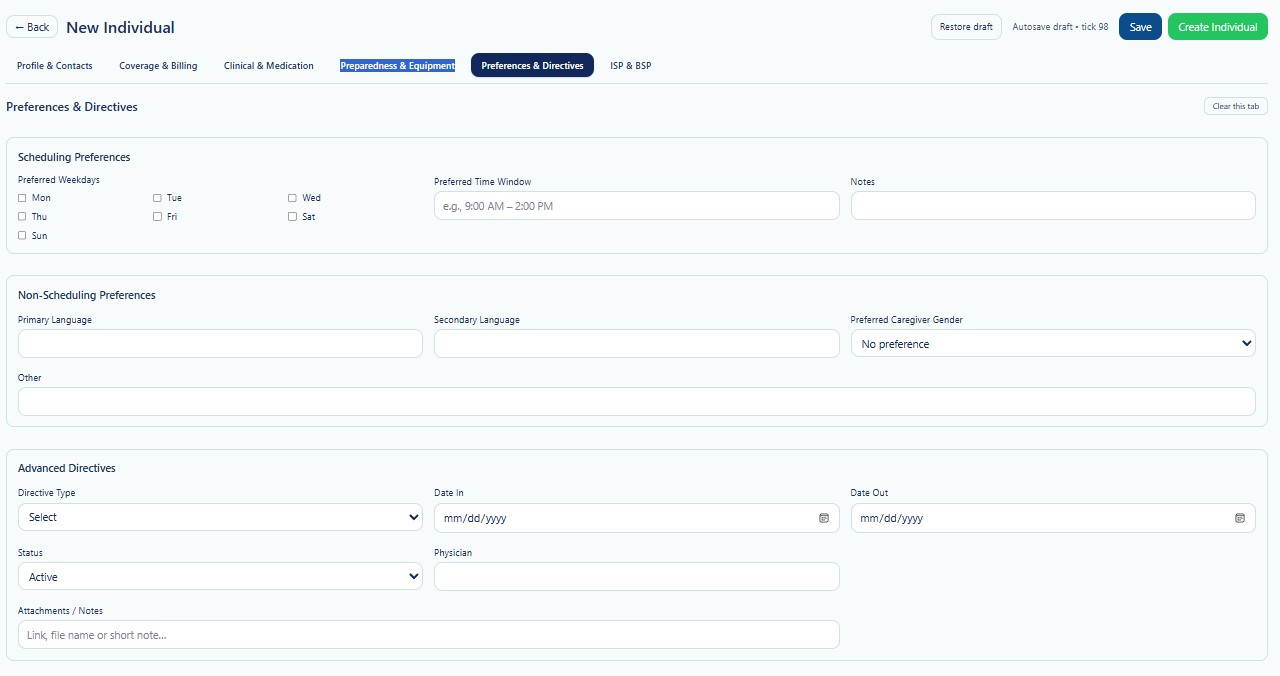
Preferences & Directives is the fifth tab in the New Individual workflow. Enter information based on the Individual's stated preferences, guardian input, care planning records, and approved directive documentation.
Page Actions
| Action | Description | When to Use |
|---|---|---|
| Back | Returns to the previous Individual page. | Use when leaving the creation workflow. |
| Restore Draft | Restores previously saved draft information. | Use when continuing an incomplete record. |
| Save | Saves current progress without creating the final Individual. | Use when preferences or directives are incomplete. |
| Create Individual | Creates the Individual after required validation passes. | Use after all required tabs have been reviewed. |
| Clear this tab | Clears values entered on the current tab. | Use carefully when restarting this section. |
Scheduling Preferences
Scheduling Preferences records the days and times the Individual prefers to receive services. Preferences guide scheduling but do not replace authorization, staffing, service, or payer requirements.
| Field | Description | Guidance |
|---|---|---|
| Preferred Weekdays | Days of the week the Individual prefers for services. | Select every applicable day. |
| Preferred Time Window | Preferred service time range. | Use a clear format such as 9:00 AM–2:00 PM. |
| Notes | Additional scheduling instructions or preferences. | Keep notes specific, current, and operationally useful. |
Preferred Weekdays
Select the weekdays that best reflect the Individual's preferred service schedule. Multiple days may be selected.
- Monday
- Tuesday
- Wednesday
- Thursday
- Friday
- Saturday
- Sunday
A preferred day does not guarantee service on that day. Final scheduling depends on authorization, staffing, service frequency, location, transportation, and Provider operations.
Preferred Time Window
Enter the time range during which the Individual prefers services. Use a specific time window whenever possible.
| Example | Meaning | Guidance |
|---|---|---|
| 8:00 AM–12:00 PM | Morning service window. | Use when the Individual prefers morning visits. |
| 12:00 PM–4:00 PM | Afternoon service window. | Use when the Individual prefers afternoon visits. |
| 4:00 PM–8:00 PM | Evening service window. | Use when evening services are preferred. |
| Flexible | No strict preference within the approved schedule. | Explain any limits or exceptions in Notes. |
Scheduling Notes
Use Notes for important scheduling details that cannot be represented by weekdays and time windows alone.
Appropriate Examples
- Avoid appointments before 10:00 AM.
- Prefer the same caregiver on weekdays.
- Call before arriving.
- Do not schedule during dialysis or medical appointments.
- Requires accessible transportation on community days.
Do not enter unrelated diagnoses, sensitive family information, or unnecessary personal details in scheduling notes.
Non-Scheduling Preferences
Non-Scheduling Preferences records communication, language, caregiver, cultural, and other person-centered preferences.
| Field | Description | Guidance |
|---|---|---|
| Primary Language | Language the Individual most commonly uses. | Enter the language used for routine communication. |
| Secondary Language | Additional language understood or used. | Optional. |
| Preferred Caregiver Gender | Individual's stated preference for caregiver gender. | Select the available value that matches the documented preference. |
| Other | Other person-centered preferences not captured above. | Use clear, respectful, and operationally relevant language. |
Language Preferences
Language preferences help the Provider plan effective communication and identify potential interpreter or translation needs.
- Record the language the Individual prefers for communication.
- Do not assume fluency based on family members or country of origin.
- Document interpreter needs through the approved Provider process.
- Use qualified language support when required.
- Do not rely on minors or unapproved staff as interpreters for sensitive communication.
Preferred Caregiver Gender
The screenshot shows No preference as the selected value. Other options may be available according to system configuration.
| Example Selection | Meaning | Operational Guidance |
|---|---|---|
| No preference | The Individual has not stated a caregiver gender preference. | Use regular caregiver matching criteria. |
| Female | The Individual prefers a female caregiver. | Consider the preference during staffing and document exceptions appropriately. |
| Male | The Individual prefers a male caregiver. | Consider the preference during staffing and document exceptions appropriately. |
| Other / Specific Request | A more specific preference or condition applies. | Describe it respectfully in the appropriate field or plan. |
The Provider should make reasonable efforts to honor the preference, but staffing, safety, authorization, availability, and legal requirements may affect final assignment.
Other Preferences
Use the Other field for important person-centered preferences not represented by the standard fields.
Examples
- Preferred communication style.
- Religious or cultural considerations.
- Food, activity, or routine preferences.
- Privacy or personal care preferences.
- Environmental sensitivities.
- Important household expectations.
Keep the wording respectful, objective, and directly related to service delivery.
Advanced Directives
Advanced Directives records directive information relevant to healthcare decisions, treatment preferences, or authorized decision-making.
| Field | Description | Guidance |
|---|---|---|
| Directive Type | Type of directive or related legal document. | Select the applicable type from the available list. |
| Date In | Date the directive becomes effective or is received. | Use MM/DD/YYYY. |
| Date Out | Date the directive expires, is revoked, or is no longer applicable. | Leave blank when ongoing and allowed. |
| Status | Current directive status. | The screenshot shows ACTIVE. |
| Physician | Physician associated with the directive when applicable. | Verify the name before saving. |
| Attachments / Notes | Reference to a document, file name, secure link, or short note. | Use approved secure storage and linking methods. |
Directive Types
The exact list depends on system configuration and Provider policy. Examples may include:
- Living Will
- Healthcare Power of Attorney
- Medical Power of Attorney
- Do Not Resuscitate Order
- POLST or similar medical order
- Guardianship or decision-making document
- Other approved directive
Do not interpret, create, or change a directive based only on verbal information. Confirm the document through the Provider's approved legal and clinical review process.
Directive Status
| Status | Description | Action |
|---|---|---|
| Active | The directive is currently valid and applicable. | Confirm current documentation and effective dates. |
| Pending | The directive is being reviewed or supporting documents are incomplete. | Do not treat it as final until verified. |
| Inactive | The directive is no longer active. | Preserve historical information according to policy. |
| Expired / Revoked | The directive has ended or was withdrawn. | Record the Date Out and retain approved documentation. |
Attachments and Notes
Use Attachments / Notes to identify where the directive document is stored or to record a short operational note.
- Use the approved document management location.
- Include a clear file name or secure link when supported.
- Do not paste entire legal documents into the Notes field.
- Do not use public file-sharing links.
- Verify access permissions before linking a document.
- Update the reference when the document is replaced or revoked.
Operational Impact
| Workflow | How the Information May Be Used | Review Needed |
|---|---|---|
| Scheduling | Supports preferred weekdays, time windows, routines, and visit planning. | Balance preferences with authorization and staffing. |
| Caregiver Matching | Supports language, gender, communication, cultural, and routine preferences. | Review qualifications, safety, and availability. |
| Clinical Coordination | Supports communication about directives, physician involvement, and decision-making. | Confirm current legal and clinical documentation. |
| Emergency Response | Helps authorized staff locate relevant directive information. | Ensure documents are current and securely accessible. |
| Compliance | Supports person-centered planning and documentation of preferences. | Review changes and maintain audit history. |
Validation Checklist
- Preferred weekdays reflect the Individual's current preference.
- Preferred time window is clear and realistic.
- Scheduling Notes contain only necessary operational information.
- Primary and Secondary Languages are accurate.
- Preferred Caregiver Gender reflects the documented preference.
- Other preferences are respectful and person-centered.
- Directive Type matches the approved document.
- Date In and Date Out are accurate.
- Directive Status reflects the current document status.
- Physician information is verified when applicable.
- Attachments or links use approved secure storage.
Best Practices
- Ask the Individual directly whenever possible.
- Document preferences objectively and respectfully.
- Review preferences after major schedule, health, staffing, or household changes.
- Do not treat preferences as authorization or guaranteed staffing.
- Use qualified interpreters when needed.
- Verify legal documents before setting a directive to Active.
- Keep directive dates and status current.
- Use secure document storage for directive files.
- Coordinate important changes with authorized clinical and administrative staff.
Security and HIPAA
Preferences & Directives may contain protected health information, language needs, personal care preferences, legal documents, physician information, and healthcare decision-making instructions.
- Access only Individuals required for assigned job duties.
- Apply role-based access and the minimum necessary principle.
- Do not share directive documents through unapproved channels.
- Verify authority before discussing directives with another person.
- Use secure document links and approved storage locations.
- Record access and changes through Audit Logs where applicable.
- Avoid unnecessary sensitive information in Notes and Other fields.
Troubleshooting
The preferred schedule cannot be accommodated.
Review authorization, staffing, transportation, service frequency, and location. Discuss available alternatives through the approved service planning process.
The preferred language is not available in the list.
Enter the language in Other and contact an administrator if the configured list requires review.
The caregiver gender preference cannot be met.
Document reasonable efforts and follow Provider policy for communication, staffing, safety, and approved exceptions.
The directive type is missing.
Select the closest approved type only when accurate. Contact an administrator if a required directive type is not configured.
The directive has expired or been revoked.
Update Status and Date Out, preserve the historical record, and replace the linked document when a new directive is received.
The attachment link does not open.
Verify the file location, permissions, secure link, and document availability.
Frequently Asked Questions
Are scheduling preferences guaranteed?
No. They guide planning, but final schedules depend on authorization, staffing, service requirements, safety, and Provider operations.
Can more than one preferred weekday be selected?
Yes. Select every day that applies.
Can the Individual choose a preferred caregiver gender?
Yes. Record the stated preference and make reasonable efforts to honor it according to Provider policy and operational availability.
Can staff interpret an advanced directive?
Staff should follow approved Provider policy and verified clinical or legal guidance. They should not independently interpret unclear legal documents.
Should expired directives be deleted?
Normally, no. Update the status and dates while preserving historical documentation according to retention policy.
Can a secure document link be entered?
Yes, when the link uses approved secure storage and authorized users have appropriate access.